

How to Recover a Brawl Stars Account (2026)
If your Brawl Stars account is connected to Supercell ID and you can open its email, recover it by choosing “Log in with Supercell ID” and entering the newest code Supercell sends. If you lost the email, use Account Protection's SMS or recovery codes when contacting official in-game Support. An unlinked account may still be recoverable, but Supercell must verify ownership and attach it to a new email.
Use only Brawl Stars' in-game Help and Support or the official support.supercell.com domain. 1v9 will never ask for your login, SMS code, verification code or recovery code.
Which Brawl Stars recovery method should you use?
| Your situation | Best first step | What you need |
|---|---|---|
| Supercell ID email works | Log in directly from the title screen | Email inbox and newest verification code |
| Email lost; Account Protection enabled | Contact in-game Support | SMS access or a saved recovery code |
| Email lost; no Account Protection | Contact in-game Support for ownership verification | Player tag, account details, purchase transaction IDs and a new email |
| Account never linked to Supercell ID | Ask in-game Support to recover and link it | Ownership evidence and an unused Supercell ID email |
| Someone else is using the account | Contact in-game Support immediately | Your legitimate recovery evidence; do not negotiate or share codes |
Do not create several conflicting tickets or guess answers. Accurate, consistent information helps Support verify the original player; trophy count and brawler lists alone are public or changeable details and do not prove ownership by themselves.
Recover a Brawl Stars account with Supercell ID email
- Install or open the official Brawl Stars app.
- From the title screen, choose Log in with Supercell ID. If a new profile loaded automatically, open Settings → Supercell ID → Log out first.
- Select the remembered account or choose Log in with another ID.
- Enter the email address originally connected to the lost game profile.
- Open the message from Supercell and enter the newest verification code.
- Confirm the correct player name, tag and progress before continuing.
Supercell ID does not use a conventional password. Requesting a new code makes older codes invalid. If no email arrives, search the inbox for “Supercell ID,” check spam and filters, verify the address and stop requesting repeated codes for a few minutes.
For normal multi-account use after recovery, follow the safe Brawl Stars account-switching steps instead of repeatedly logging out or relying on device-only saves.
Recover a linked account without email access
First try the email provider's official recovery flow. If the inbox cannot be restored, open Brawl Stars and contact Supercell:
- Open Settings.
- Select Help and Support.
- Tap the contact or message button in the top-right corner.
- Choose the account-access or Supercell ID topic and start a recovery conversation.
- Explain that the game profile is connected to an email you cannot access.
- Provide a new email address that is not already attached to a Supercell ID when Support requests it.
If Account Protection was enabled, Support can use an SMS verification code or one of your saved recovery codes to verify you. A recovery code is not something to paste into a public form, social post, Discord server or this website. Only share it inside the official Support conversation you initiated.
Changing the email yourself is easier when the game account is still open on a trusted device: go to Settings → Supercell ID → cogwheel → Change Email. The ordinary change flow sends a confirmation code to the current email; choose the official support route when that inbox is unavailable.
Recover an account that was not linked to Supercell ID
An unlinked account is not automatically unrecoverable. Supercell's current support guidance says it may restore access if it can verify ownership. Use the same in-game Help and Support path, then prepare a fresh email address because the recovery process creates a Supercell ID for the restored profile.
If the old device still opens the correct profile, do not uninstall, clear app data or reset that device. Connect the profile immediately by following the Supercell ID linking guide. On Android, an older Google Play Games login may load device-associated progress, but Supercell ID is the supported cross-device account system; on iOS, Game Center is not a replacement for securing the profile with Supercell ID.
Information to prepare for Supercell Support
Supercell lists the following details for an account without Account Protection:
- Player ID or player tag, including the leading # when applicable.
- Account name and account/XP level.
- Current club name, if the account belongs to one.
- Transaction IDs from legitimate purchases made on the account.
- A new email address that is not already connected to Supercell ID.
You can find a lost player tag through an in-game friend who can open the profile, another account's Friends list, or the member list of the account's club. A tag helps Support locate the profile, but Supercell explicitly says it is not sufficient proof on its own.
Use exact transaction IDs from Apple, Google or the Supercell Store rather than bank-card details. Never send a full card number, government ID or unrelated personal documents unless the official support flow specifically and lawfully requires something; ordinary recovery guidance does not ask you to publish that information.
Protect the recovered Brawl Stars account
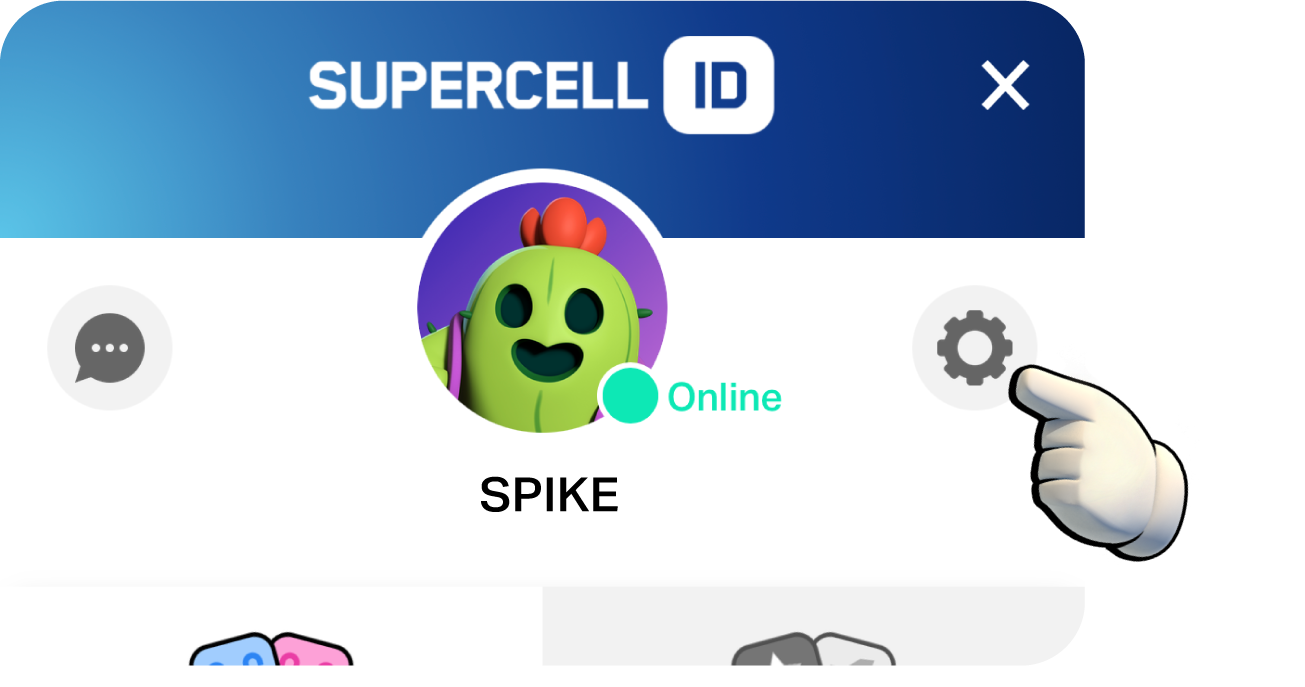
- Open Settings → Supercell ID → cogwheel.
- Under Account Protection, tap Activate and follow the prompts.
- Link a phone number you control and save every generated recovery code somewhere separate from the phone.
- Record your player tag and legitimate purchase transaction IDs in a private, secure place.
- Protect the connected email with a unique password and its own multi-factor authentication.
Account Protection cannot be disabled through Settings or Support after activation. You can reset it to change the linked number and generate new recovery codes, but new codes invalidate old ones and regeneration is limited. Supercell also warns that losing the email, protected phone number and recovery codes can make recovery impossible.
Account Protection may be unavailable for Young Player accounts, accounts with unusual activity and certain regions. If the button is absent, keep the Supercell ID email secure and follow the current official support notice for that account.
Never buy, sell, lend or share the recovered profile. Supercell's Terms prohibit account transfers, and shared ownership disputes can prevent Support from determining who should control an account. Once access is secure, the Brawl Stars fundamentals guide can help rebuild familiarity without risky shortcuts.
Brawl Stars account recovery FAQ
Can you recover Brawl Stars without Supercell ID?
Possibly. Contact in-game Supercell Support. If ownership is verified, Support can attach the recovered game profile to a new email and create a Supercell ID.
Can you recover an account with only the player tag?
No. The tag helps locate the account, but Supercell says it is not sufficient proof by itself. Support may also need the account name, level, club and purchase transaction IDs.
Why is the Supercell ID code not arriving?
Confirm the original email, search spam and filters, and use only the newest requested code. After three incorrect attempts, wait through the stated 24-hour lockout before trying again.
Will Supercell ask for a verification code?
Supercell uses email, SMS and recovery codes in official flows, but it says it will not contact you unexpectedly for a login code. Only provide a code inside an in-game Support conversation you started.
How long does recovery take?
Supercell does not publish a guaranteed time. Ticket volume and the strength of your ownership evidence affect the process, so avoid fabricated “instant recovery” services.
Official sources and update policy
The recovery paths and requested ownership details were checked against Supercell's official lost-account instructions. Verification-code behavior comes from the official Supercell ID help pages, and phone/recovery-code rules come from the official Account Protection page. Account-sharing warnings were checked against Supercell's current Terms and safety guidance. Recheck this article whenever Supercell changes its in-game contact flow.
Posted On: March 23rd, 2026
Recent Articles


Our 1v9 support team is available 24/7 to help you with any questions or issues you may have.
support@1v9.gg


-a6d5b3e156bb.webp)





Loading...
1v9.gg is not endorsed or affiliated by any game developers or publishers.
2026 1v9, All Rights Reserved, Created By Ritesh (riteshsahoo.com)