- Home
Games
 League of Legends
 Valorant
-a6d5b3e156bb.webp) Fortnite
Fortnite Call of Duty
 Clash of Clans
 Counter-Strike 2
 Roblox
 Rainbow Six Siege
 Clash Royale
 Minecraft
 Rocket League
 Dota 2
 Genshin Impact
 Squad Busters
 Rust
Rust Apex Legends
 Pokemon Go
 XDefiant
 LoL: Wild Rift
 Hay Day
 Diablo 4
 FC 25
FC 25 Marvel Rivals
 World of Warcraft
 Destiny 2
 Deadlock
-9ede9dc6b01b.webp) PUBG Mobile
PUBG Mobile The Finals
 Growtopia
 Forza Horizon 5
 Honkai: Star Rail
 Warframe
 8 Ball Pool
 Zenless Zone Zero
 Path of Exile
 Runescape 3
 Raid: Shadow Legends
 Lost Ark
 WoW: Classic Era
 Summoners War
 WoW: Season of Discovery
 WoW Cataclysm
 WoW: Hardcore
 Throne and Liberty
 New World
 Mobile Legends
 Escape From Tarkov
 Path of Exile 2
 Blade Ball
 Fisch
Fisch Pet Simulator 99
 Pets Go
-d8bcef7708c7.webp) One Piece Bounty
One Piece Bounty Anime Adventures
 Blox Fruits
 Adopt Me
 Murder Mystery 2
 Fragpunk
 Wuthering Waves
 Teamfight Tactics
 Free Fire
 Albion Online
 Black Desert Online
 Honor of Kings
 Brawl Stars
 Arena of Valor
 Call of Duty: Mobile
 Rematch
 Steal a Brainrot
 Grow a Garden
 FC 26
FC 26 Old School Runescape
 Plants vs Brainrots
 Overwatch
 Battlefield
 Arc Raiders
 Dragon Ball Legends
 Fallout 76
 Jailbreak
 Type Soul
 GPO
GPO DonutSMP
 Escape Tsunami For Brainrots
 Watcher of Realms
 Roblox Rivals
 2XKO
2XKO Sailor Piece
 Forza Horizon 6
 GTA 5
GTA 5- Lootboxes
- Become Affiliate
- Blog
- Contact Us
- Sign In

WASD Controls in League of Legends: All You Need to Know
League of Legends lets you customize camera movement in several different ways, and while edge scrolling is the default, some players prefer using keyboard movement for tighter control. Using WASD to move the camera is especially popular among players coming from FPS games, where constant keyboard movement feels more natural and controlled than dragging the screen with a mouse.
Because League abilities already use Q, W, E, and R by default, switching to WASD means you’ll need to rethink your entire keybinding layout. It’s not a plug-and-play change, but for the right player, it can make camera control feel smoother and more intentional. In this guide, we’ll explain how to set up WASD camera movement in League of Legends, recommend practical keybind alternatives, and go over the pros and downsides so you can decide if this setup is worth using long-term.
What WASD Controls Do in League of Legends
In League of Legends, WASD has nothing to do with moving your champion. Your character will always move by right-clicking with the mouse, no matter what keybinds you use. When players talk about using WASD in League, they’re referring only to camera movement, not character control.
Assigning WASD to the camera lets you scroll the map by pressing keys instead of dragging the screen with your mouse or pushing the cursor to the edge. This can feel more controlled and comfortable, especially for players coming from shooters. The trade-off is that League’s default ability keys sit on Q, W, E, and R, so switching to WASD forces you to remap abilities, items, summoner spells, and other hotkeys. It’s a full control overhaul, not a small tweak, and it only really makes sense if you’re willing to relearn your muscle memory.
How to Enable WASD Camera Controls?
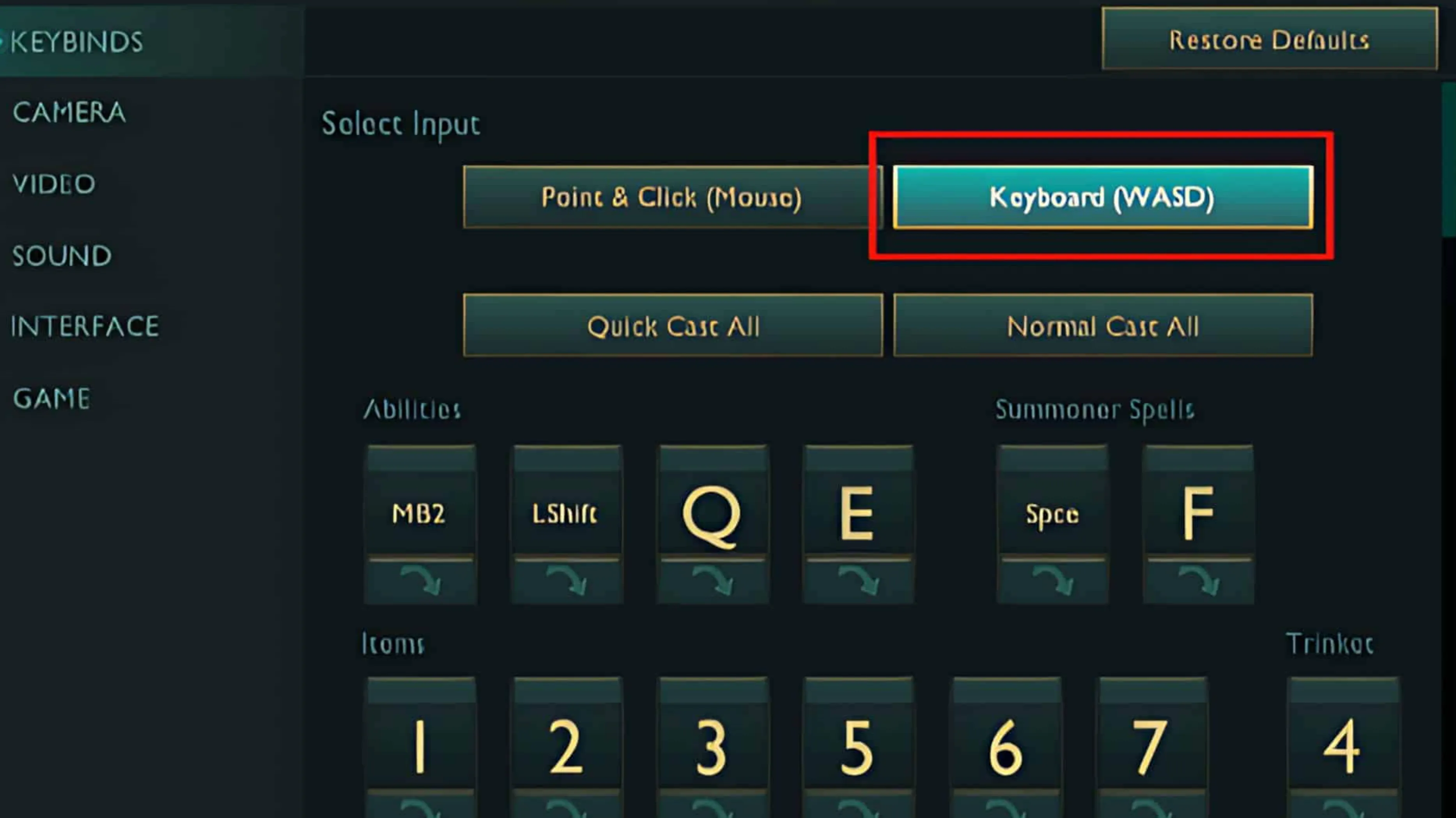
League of Legends doesn’t enable WASD camera movement by default, but Riot does include an official option for players who want to control the camera with their keyboard instead of relying on mouse movement. Normally, camera control is handled by edge scrolling, middle mouse dragging, or locking and unlocking the camera with the Y key.
If you want to switch to WASD-style camera movement, you can do it directly from the settings menu. Start by pressing Esc in the client or during a match to open the Options menu. From there, head into the Hotkeys section and look for the keyboard input settings. Enable Keyboard (WASD) controls, then save your changes so they apply to every future game.
Once this option is turned on, League automatically enables a dynamic camera mode that keeps your champion centered while you move the camera with the keyboard. If that feels restrictive, you can change it back to a fully unlocked camera from the Camera settings. It’s also worth noting that League lets you mix control styles, so your shop, items, and other actions can still use traditional point-and-click keys while the camera is handled with WASD. This flexibility makes it easier to experiment and fine-tune the setup until it feels comfortable.
Best LoL Hotkeys for WASD Camera Setup
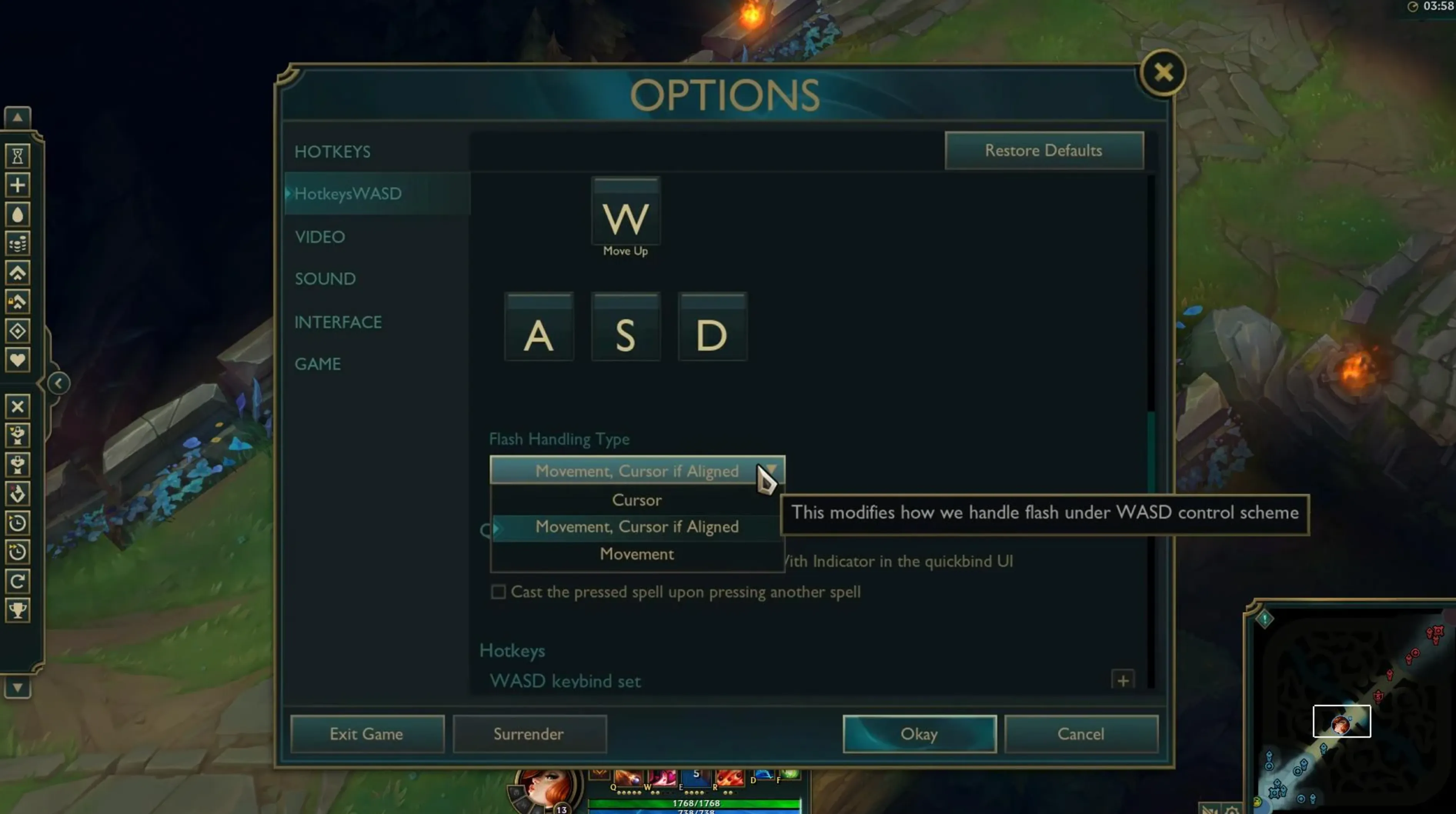
When you switch to a WASD camera setup in League of Legends, the biggest adjustment is reworking your ability and action keys. Since WASD is now handling camera movement, your old muscle memory for QWER won’t work anymore, so everything important needs to be moved somewhere that still feels fast and natural. Riot’s default WASD layout places abilities on right-click, Shift, E, and R, with summoner spells on Q and F, but many players find that setup limiting and tweak it further.
Most WASD players end up building a layout around easy-to-reach keys or their mouse. Abilities are commonly moved to number keys like 1, 2, 3, and 4, or bound directly to extra mouse buttons if you have them. Attack Move is often placed on a thumb mouse button or combined with Shift and right-click for better kiting control. “Target Champions Only” usually goes somewhere central like the spacebar or T so it’s easy to hold during fights. Summoner spells are frequently moved to nearby keys such as C and V, while items are spread across keys like Z, X, C, V, B, or even Alt-modified keys to avoid finger strain. Trinkets often end up on T or another spare mouse button.
The most important rule is comfort and speed. Your hands should rest naturally on the keyboard, and every key you press in fights should be reachable without stretching or hesitation. If a bind feels awkward, it will slow you down in clutch moments, so don’t be afraid to experiment in practice tool until everything feels automatic. A clean WASD setup isn’t about copying someone else’s layout, it’s about building one that lets you react instantly without thinking about your keys.
WASD vs. Mouse Edge Scrolling in LoL
When it comes to camera control in League of Legends, the choice between WASD movement and classic mouse edge scrolling really depends on your background and what feels natural in your hands. Neither option is objectively better, but each one changes how you interact with fights, positioning, and overall map awareness.
Using WASD to move the camera gives you tighter control in chaotic moments. Because your mouse stays free, it’s easier to keep your cursor exactly where you want it during teamfights, skillshots, or kiting. This setup often feels more stable when tracking fast-moving champions and is especially comfortable for players coming from FPS or third-person games. The downside is that it forces a full keybind overhaul. Abilities, items, and summoner spells all need new placements, and rebuilding that muscle memory takes time. Some players also find that losing the traditional QWER layout makes certain actions feel less accessible at first.
Mouse edge scrolling sticks closely to how League was originally designed. Your abilities remain on familiar keys, and if you’ve played the game for years, everything feels automatic. Camera movement is simple and intuitive, and middle mouse dragging is always there as a backup. However, edge scrolling can pull your cursor away from important targets, especially in tight fights, which may lead to misclicks or slower reactions if you’re not careful. Constant mouse movement can also feel tiring for some players over long sessions.
In practice, most veteran and high-elo players stay with edge scrolling or middle mouse dragging because it matches their long-established habits. WASD tends to shine for newer players or those transitioning from other genres who value camera precision over keeping League’s default layout. The best option is the one that lets you play confidently without thinking about your inputs, so experimenting in practice games is always worth it before committing.
Best Tips for Transitioning to WASD Camera Controls
Moving over to WASD camera controls in League of Legends is a big change, and it’s normal for your gameplay to dip at first. The worst thing you can do is switch and instantly queue ranked. Instead, spend time in the Practice Tool and custom games. Focus on basics like farming, moving the camera smoothly, dodging skillshots, and casting abilities in the right order. A short daily session like this helps retrain your muscle memory without any pressure.
When you start playing normal games, pick champions with straightforward kits. Champions such as Garen, Annie, or Malphite let you concentrate on learning the new controls rather than juggling complex mechanics. Highly technical champions that demand fast combos and precise inputs are better saved for later, once the new setup feels natural.
You also don’t need to change every keybind in one go. Many players ease into WASD by enabling camera movement first, then slowly adjusting abilities, items, and summoner spells over several days. Keeping a small note of your new bindings nearby can save you from hesitation during fights while everything is still fresh.
Finally, be patient with yourself. Missed inputs, slower reactions, and awkward moments are part of the process. For most players, the adjustment period lasts anywhere from a few days to a couple of weeks, depending on playtime. Give the setup a fair chance before deciding if WASD camera controls are right for you.
FAQs
Does WASD move my champion in League of Legends?
No. WASD only moves the camera. Your champion still moves using right-click with the mouse, just like the default control setup.
Is using WASD allowed in ranked games?
Yes. WASD camera controls are an official Riot-supported option, so using them in ranked is completely allowed.
Do pro players use WASD camera controls?
Most professional and high-elo players stick to edge scrolling or middle-mouse dragging because of long-term muscle memory, but WASD is perfectly viable, especially for newer players.
Will switching to WASD make me play better?
It depends on the player. Some feel more comfortable and precise with WASD, especially if they come from FPS games, while others perform better with traditional mouse controls.
Can I switch back to normal camera controls anytime?
Yes. You can disable WASD camera movement instantly in the settings and return to edge scrolling or locked camera whenever you want, with no penalties.
Conclusion
WASD camera controls in League of Legends offer a completely different way to experience the game, especially for players coming from FPS or third-person titles who prefer keyboard-based movement. While this setup takes time to learn and requires reworking your keybinds, it can provide smoother camera control and better positioning once you’re comfortable with it. Whether WASD ends up being your long-term choice or just an experiment, understanding how it works and when it makes sense to use can help you find a control setup that fits your playstyle and makes each match feel more natural and controlled.
Posted On: February 1st, 2026
Recent Articles


Our 1v9 support team is available 24/7 to help you with any questions or issues you may have.
support@1v9.gg
Loading...
1v9.gg is not endorsed or affiliated by any game developers or publishers.
2026 1v9, All Rights Reserved, Created By Ritesh (riteshsahoo.com)