
-9ede9dc6b01b.webp)

How To Get Unbanned From PUBG Mobile: Ban Appeal Guide
Getting banned in PUBG Mobile can be extremely frustrating, especially when you lose access to your account, skins, UC purchases, and all the progress you’ve built over time. Whether the ban came from a false report, a system mistake, or an unintentional violation, the good news is that most bans can be appealed if you know what steps to follow. This guide walks you through everything you need to understand—why bans happen, the different types of PUBG Mobile bans, how the appeal system works, and exactly what to include in your request to increase your chances of getting your account restored. If your goal is to get unbanned as quickly as possible, this article gives you a clear and straightforward path to do it.
PUBG Mobile Ban Types
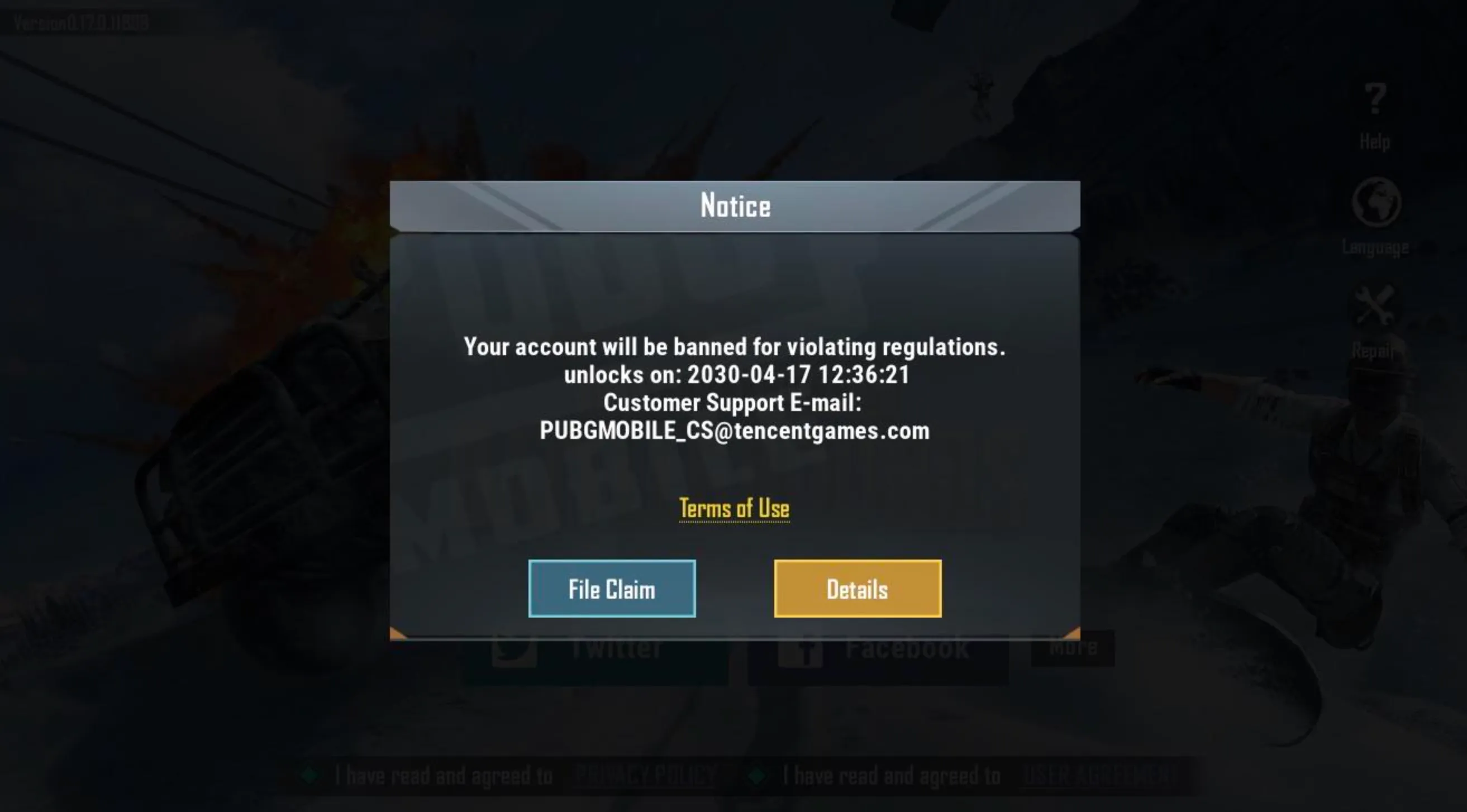
PUBG Mobile uses several kinds of bans depending on what triggered the penalty, and understanding each type makes it easier to know what you’re dealing with before starting an appeal. The most common one is a temporary ban, usually lasting anywhere from a few hours to 30 days, and it’s typically issued for things like suspected cheating, unusual behavior flagged by the system, or repeated reports from other players. In these cases, your account stays intact—you just can’t log in until the ban expires. A permanent ban is the harshest penalty and completely disables your account for good, wiping out access to your skins, UC, progress, and statistics. These usually happen when the system detects third-party tools, heavy cheating, account manipulation, or confirmed rule violations. There is also a device ban, where PUBG Mobile blocks your phone or tablet from accessing the game at all, even if you try to log in with another account. Some players also receive matchmaking or mode-specific bans, which restrict access to certain playlists if you leave matches too often or abuse gameplay mechanics. Because PUBG Mobile’s anti-cheat system is strict and automated, false positives can happen, which is why knowing the exact ban type is crucial before submitting a proper appeal.
Why You Got Banned in PUBG Mobile

PUBG Mobile bans usually happen when the system detects behavior that breaks the game’s rules, and while many bans target real cheaters, innocent players can sometimes get caught in automated checks. The most common reason for bans is the use of third-party tools, including cheats, radar apps, unauthorized scripts, aim assistance, or modified game files that give unfair advantages. Toxic behavior can also trigger bans, such as verbal harassment, griefing teammates, exploiting bugs, or intentionally ruining matches. Another frequent cause is account security issues—if your account gets compromised and the attacker cheats on it, the system will still ban the account. Additionally, using VPNs from flagged regions, playing on emulators without authorization, or engaging in suspicious trading behavior can lead to penalties. Understanding exactly what triggered your ban is the first step in crafting a proper appeal and getting your PUBG Mobile account back.
How to Appeal a Ban and Get Unbanned From PUBG Mobile
Getting unbanned from PUBG Mobile starts with understanding how the appeal system works and what PUBG’s support team expects from you. PUBG Mobile bans are handled through the official support channels, and the method you use depends on the type of violation you were flagged for. To begin the process, open the game and check the exact ban message on your screen — this will show the reason for the ban and the duration. Once you have that information, visit the official PUBG Mobile support page or use the in-game customer service button. From there, select the moderation category, describe your situation clearly, and attach any evidence that proves the ban was incorrect, such as login logs, screenshots, or proof of account compromise. If the ban happened because someone else accessed your account, explain how it happened and what steps you have taken to secure the account. Keep your message polite, factual, and easy to read, as this increases your chances of a successful review. PUBG Mobile only reviews each ban once, so make sure your appeal is well-written and includes your Player ID, in-game name, device information, the date of the ban, and the message you received. Once submitted, all you can do is wait for the support team’s decision, as spamming multiple tickets will not speed up the process.
Writing a Strong Appeal to Get Unbanned from PUBG Mobile
When you’re trying to get unbanned from PUBG Mobile, the appeal you submit is the most important part of the entire process. Support teams review huge numbers of requests every day, so a clear, calm, and well-written explanation gives you a much better chance of having your ban reversed. Start by describing what happened in simple, honest terms. If you made a mistake, admit it directly and explain what you’ve learned. If your account was compromised, make sure to mention when you lost access and what steps you’ve taken to secure it afterward. And if you believe the ban was issued unfairly, explain why without blaming the system or attacking the support team.
Keep your message short but detailed enough to show that you understand PUBG Mobile’s rules and that you’re serious about preventing the issue from happening again. Avoid emotional language, threats, or excuses — they only make your appeal look weaker. If you have evidence that supports your case, such as screenshots or proof of unusual login activity, include it in your message. Before submitting the appeal, read it carefully to ensure it is respectful, grammatically correct, and easy to understand. A polite and well-structured appeal stands out far more than a rushed message, and it signals to the support team that you’re a genuine player looking for a fair review of your account.
How Long Until PUBG Mobile Unbans Your Account?
The time it takes for PUBG Mobile to unban your account depends entirely on the type of penalty you received. Temporary bans—usually triggered by suspicious activity, emulator issues, or minor rule violations—can last anywhere from 24 hours to 30 days, and these automatically expire once the countdown finishes. However, if your account was permanently banned for cheating, unauthorized third-party software, or severe rule violations, it will not lift on its own and can only be reversed through a successful appeal. Appeals typically take a few days for Tencent’s support team to review, but response times vary based on the volume of requests. In short, temporary bans have fixed durations, while permanent bans require a detailed appeal and supporting evidence to have any chance of being overturned.
Preventing Future Bans on PUBG Mobile
Avoiding future bans in PUBG Mobile comes down to keeping your gameplay clean, your account secure, and your device free of anything that could trigger the automated detection system. The game has strict anti-cheat technology, which means even small rule violations can lead to suspensions if they look suspicious. Always play on an unmodified device and avoid any third-party apps that change graphics, recoil, aim, sensitivity, or game files. Even tools marketed as “safe” like GFX tweaks, injector skins, or key-mapping apps outside of official emulators can result in long-term bans. Keep your account protected by enabling all available security options and never sharing your login with friends, boosting services, or random websites promising free UC or rewards. Also make sure you never exploit glitches, abuse matchmaking, or team up with enemies to manipulate ranked matches, as these behaviors are monitored by the system. Staying updated with PUBG Mobile rules, avoiding risky software, and protecting your account information are the best ways to make sure you never run into another ban again.
Conclusion
Getting unbanned from PUBG Mobile comes down to understanding why the restriction happened, following the correct appeal process, and presenting a clear and honest explanation when contacting support. While not every ban can be reversed, players who act quickly, provide accurate details, and show they understand the rules have a much stronger chance of recovering their accounts. Staying informed about fair-play policies, avoiding third-party tools, and keeping your account secure will also help you avoid future bans. With the right approach, you can appeal your suspension and get back to enjoying PUBG Mobile without setbacks.
Posted On: December 3rd, 2025
Recent Articles


Our 1v9 support team is available 24/7 to help you with any questions or issues you may have.
support@1v9.gg


-a6d5b3e156bb.webp)





Loading...
1v9.gg is not endorsed or affiliated by any game developers or publishers.
2026 1v9, All Rights Reserved, Created By Ritesh (riteshsahoo.com)