 League of Legends
 Valorant
-a6d5b3e156bb.webp) Fortnite
Fortnite Call of Duty
 Clash of Clans
 Counter-Strike 2
 Roblox
 Rainbow Six Siege
 Clash Royale
 Minecraft
 Rocket League
 Dota 2
 Genshin Impact
 Squad Busters
 Rust
Rust Apex Legends
 Pokemon Go
 XDefiant
 LoL: Wild Rift
 Hay Day
 Diablo 4
 FC 25
FC 25 Marvel Rivals
 World of Warcraft
 Destiny 2
 Deadlock
-9ede9dc6b01b.webp) PUBG Mobile
PUBG Mobile The Finals
 Growtopia
 Forza Horizon 5
 Honkai: Star Rail
 Warframe
 8 Ball Pool
 Zenless Zone Zero
 Path of Exile
 Runescape 3
 Raid: Shadow Legends
 Lost Ark
 WoW: Classic Era
 Summoners War
 WoW: Season of Discovery
 WoW Cataclysm
 WoW: Hardcore
 Throne and Liberty
 New World
 Mobile Legends
 Escape From Tarkov
 Path of Exile 2
 Blade Ball
 Fisch
Fisch Pet Simulator 99
 Pets Go
-d8bcef7708c7.webp) One Piece Bounty
One Piece Bounty Anime Adventures
 Blox Fruits
 Adopt Me
 Murder Mystery 2
 Fragpunk
 Wuthering Waves
 Teamfight Tactics
 Free Fire
 Albion Online
 Black Desert Online
 Honor of Kings
 Brawl Stars
 Arena of Valor
 Call of Duty: Mobile
 Rematch
 Steal a Brainrot
 Grow a Garden
 FC 26
FC 26 Old School Runescape
 Plants vs Brainrots
 Overwatch
 Battlefield
 Arc Raiders
 Dragon Ball Legends
 Fallout 76
 Jailbreak
 Type Soul
 GPO
GPO DonutSMP
 Escape Tsunami For Brainrots
 Watcher of Realms
 Roblox Rivals
 2XKO
2XKO Sailor Piece
 Forza Horizon 6
 GTA 5
GTA 5

Unlock an emote, equip it in the Preparation or Battle Emote loadout, then open the communication panel during a match and tap the emote. Some emotes can also be assigned to automatic triggers; an owned but unequipped emote will not appear.
Related 1v9 reading: MLBB settings guide.
Emotes in Mobile Legends: Bang Bang are a fun way to communicate during matches without using chat or voice. Whether you want to celebrate a play, hype up your team, or just add a bit of personality to your gameplay, emotes make every match feel more interactive.
They’re simple to use, but a lot of players don’t fully take advantage of them or don’t know how to set them up properly. Once you understand how they work, you can use them quickly in fights, after kills, or even to tilt your opponents.
In this guide, we’ll go over how to equip and use emotes in Mobile Legends, along with a few tips on how to use them effectively in real games.
How to Use Emotes in Mobile Legends
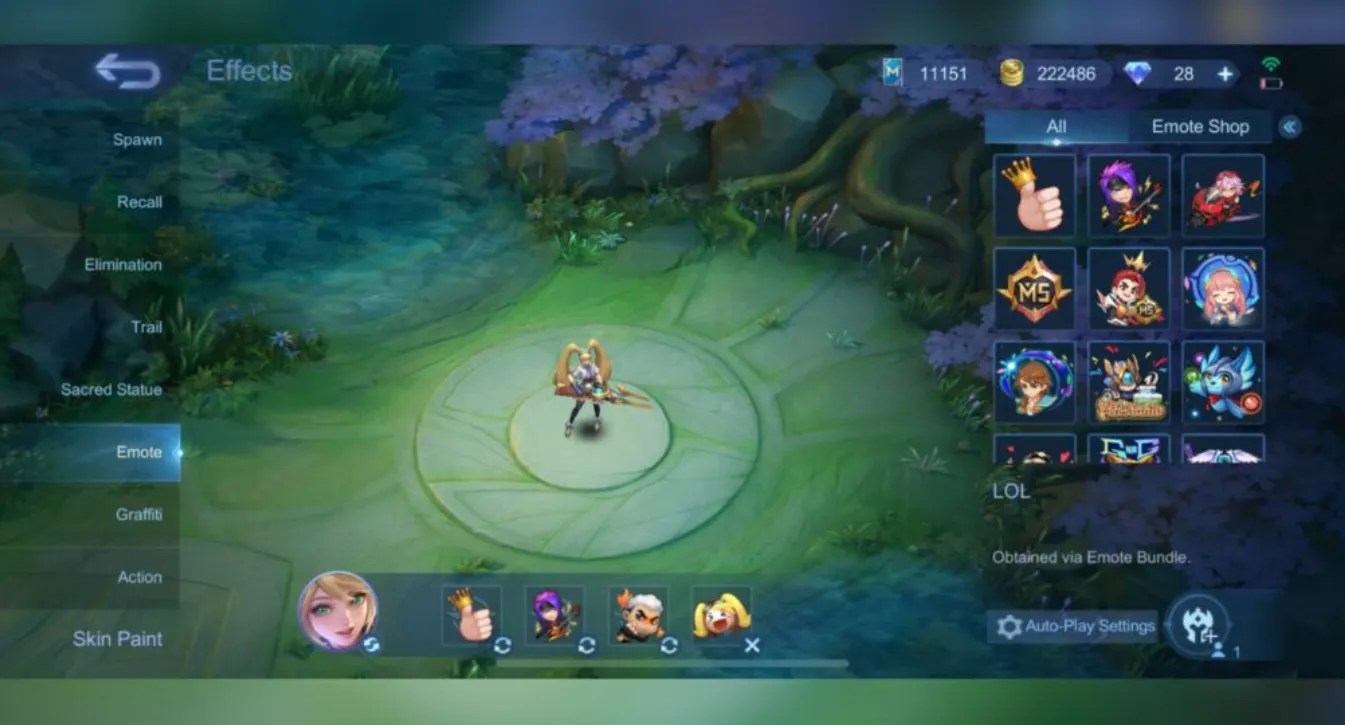
Using emotes in Mobile Legends is very simple, but you first need to equip them before you can use them in-game.
To set them up, go to your inventory or profile, find the emotes section, and choose the ones you want to use. You can assign them to your emote wheel so they’re ready during matches.
Once you’re in a game, look for the emote icon on your screen (usually near your skills). Tap it to open the emote wheel, then select the emote you want to use. Your character will instantly perform it.
You can use emotes anytime, whether it’s after getting a kill, during a fight, or just to interact with teammates. Many players use them to celebrate, communicate, or even provoke enemies.
If you want to use emotes effectively, try to keep your favorites equipped and use them at the right moments, like after winning a fight or securing an objective.
How to Get Emotes in Mobile Legends
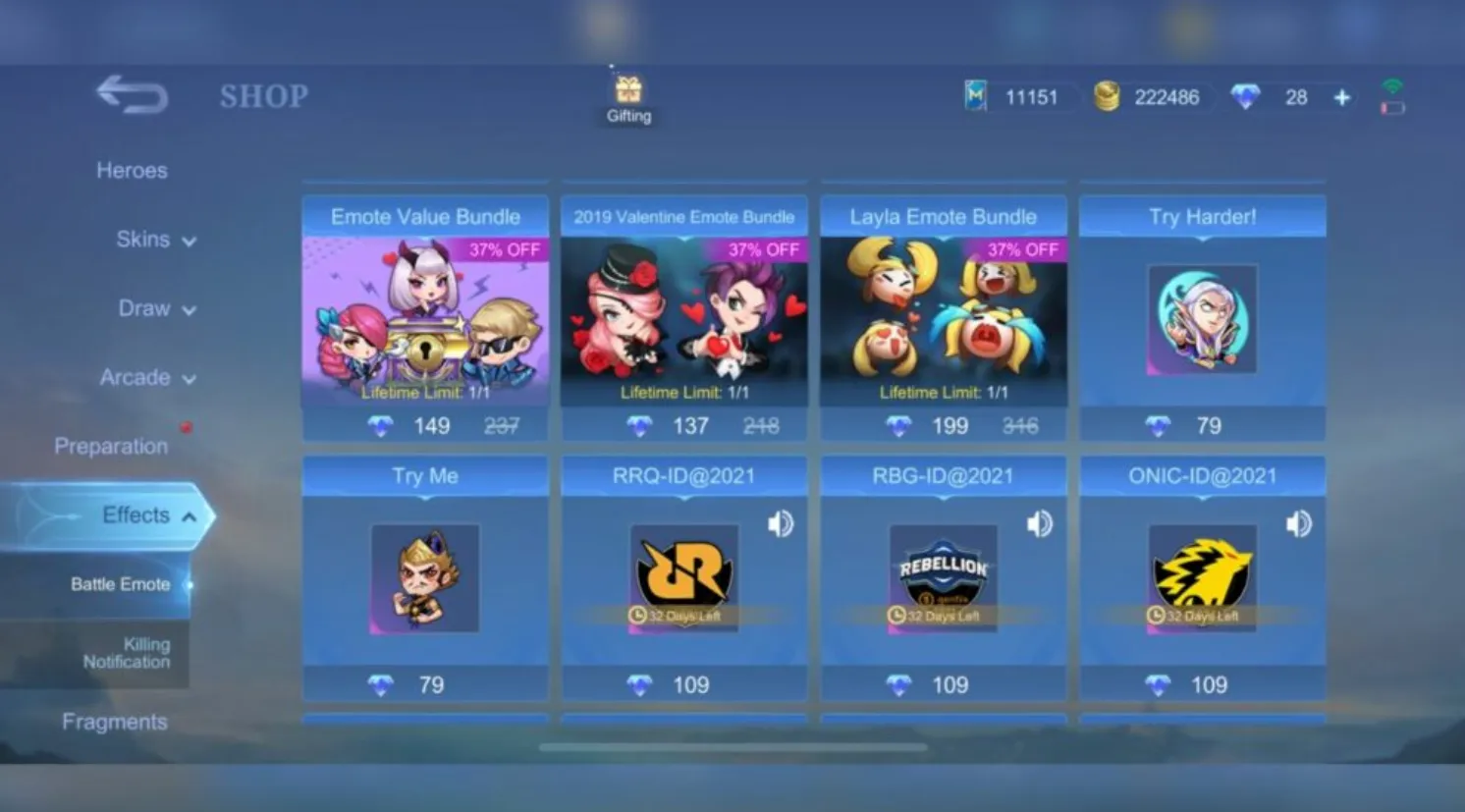
There are several ways to unlock emotes in Mobile Legends, and most of them are pretty easy if you play regularly or check events often.
The most common way is through in-game events. Mobile Legends frequently gives out free emotes during limited-time events, missions, or seasonal rewards. If you stay active, you’ll slowly build a good collection without spending anything.
You can also get emotes from the shop. Some are available for Diamonds or Battle Points, while others appear in bundles or special offers. These are usually permanent and can be used anytime once unlocked.
Another solid option is the Starlight Membership. Each month, it often includes exclusive emotes along with skins and other rewards, making it a good deal if you already spend Diamonds regularly.
Emotes can also come from draw events and lucky spins, especially during collaborations or big updates. These are usually limited-time, so if you see one you like, you’ll need to get it while it’s available.
If you want to build a good emote collection, the best approach is simple: play events, check the shop regularly, and take advantage of Starlight or special promotions when they’re worth it.
Conclusion
Using emotes in Mobile Legends is a simple feature, but it can make your games feel a lot more fun and interactive. Once you know how to equip them and use them during matches, they become a quick way to express yourself without typing or using voice chat.
Whether you’re celebrating a play, communicating with your team, or just adding personality to your gameplay, emotes help bring more life into every match. The key is setting up your favorites and using them at the right moments so they feel natural.
At the end of the day, emotes aren’t about winning or losing, they’re about enjoying the game more. If you use them well, they can make every match feel more engaging and memorable.
Sources and update policy
Primary verification: Official Mobile Legends site. Time-sensitive mechanics, availability and prices should be rechecked after major patches.


