-9ede9dc6b01b.webp)

How to Redeem PUBG Mobile Gift Cards: Step-by-Step Guide
PUBG Mobile is a fast-paced battle royale game designed for mobile devices, where players parachute onto massive maps, loot weapons and gear, and fight until only one player or squad remains. Alongside the core gameplay, PUBG Mobile uses a premium currency called UC, which is required to unlock skins, outfits, Royale Passes, and other cosmetic items. While UC can be purchased directly in-game, many players choose gift cards as a safer and more flexible way to top up without linking a credit card. In this guide, you’ll learn exactly how to redeem PUBG gift cards step by step, how the UC top-up process works, and what you can spend your UC on once it’s added to your account.
How to Redeem UC in PUBG Mobile
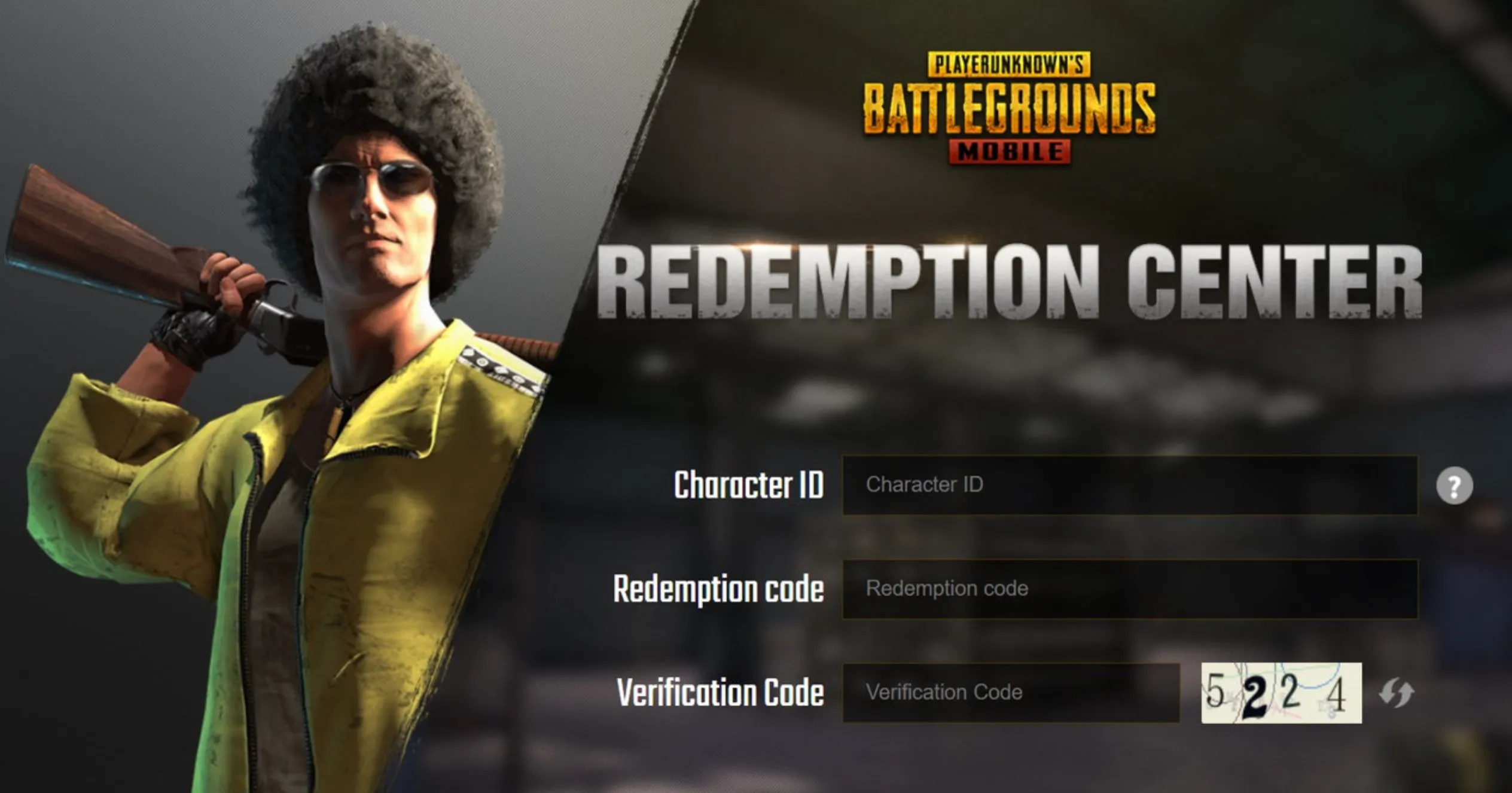
Redeeming UC in PUBG Mobile is quick and only takes a minute if you follow the right steps. Start by opening the official PUBG Mobile redemption website in your browser. Once there, enter your Character ID, which you can find in-game by tapping your profile icon and copying the ID shown under your name. Next, type in the gift card or UC code exactly as it appears, then complete the verification step by entering the letters and numbers shown on the screen. After everything is filled in, click the Redeem button to confirm. If the details are correct, your UC will be credited to your account almost instantly, and you’ll see the updated balance the next time you open PUBG Mobile. Always double-check that you’re logged into the correct account before redeeming, since each code can only be used once and can’t be moved to another account after activation.
What You Can Buy with a PUBG Gift Card
UC is PUBG Mobile’s premium currency and is mainly used to unlock cosmetic content and premium features that aren’t available through normal play. It gives players access to customization options that let them personalize their account and stand out in matches.
With UC, you can purchase things like the Royale Pass, including Elite and Elite Plus versions, which unlock extra missions, exclusive rewards, and seasonal cosmetics. It’s also used for character outfits, themed clothing sets, weapon finishes, vehicle skins, parachutes, emotes, and special bundles. Many players spend UC on crates and Lucky Spins to try their luck at limited-time items, as well as utility items like Rename Cards.
All UC purchases are visual or cosmetic only. They don’t boost damage, improve stats, or give any competitive advantage. Instead, UC is purely about style, customization, and unlocking premium content that enhances how your character and gear look in PUBG Mobile.
FAQs
Do PUBG Mobile gift cards work worldwide?
PUBG gift cards are region-locked, so you must redeem a code that matches the region of your PUBG Mobile account.
Where can I find my PUBG Mobile Character ID?
Open PUBG Mobile, tap your profile icon, and copy the ID shown under your username.
Can I redeem a PUBG gift card more than once?
No, each PUBG gift card code can only be used one time and cannot be transferred after redemption.
Is UC added instantly after redeeming the code?
Yes, once the code is successfully redeemed, UC is credited to your account immediately.
Conclusion
Redeeming PUBG gift cards is a quick and safe way to top up UC without linking a credit card or using in-game payments. Once you know where to find your Character ID and how the redemption page works, the entire process takes just a minute. Whether you’re unlocking the Royale Pass, grabbing new skins, or saving UC for future events, gift cards give you full control over your spending while keeping your account secure. If you follow the steps correctly and redeem the code on the right account and region, your UC will appear instantly, letting you jump straight back into PUBG Mobile with new customization options ready to use.
Posted On: January 25th, 2026
Recent Articles


Our 1v9 support team is available 24/7 to help you with any questions or issues you may have.
support@1v9.gg


-a6d5b3e156bb.webp)





Loading...
1v9.gg is not endorsed or affiliated by any game developers or publishers.
2026 1v9, All Rights Reserved, Created By Ritesh (riteshsahoo.com)