


How To Check Stash Value In ARC Raiders
Knowing the total value of your stash in ARC Raiders can be surprisingly useful, especially if you’re planning ahead for an Expedition project or deciding what items are worth keeping versus selling. Instead of guessing, there’s a simple way to figure out how many coins your inventory is actually worth. This guide walks you through an easy method to calculate your stash value, along with a handy shortcut that saves time if you’re dealing with a large inventory. We’ll also clear up common questions about how stash value works and why it matters for Expedition progress.
How To Check Stash Value
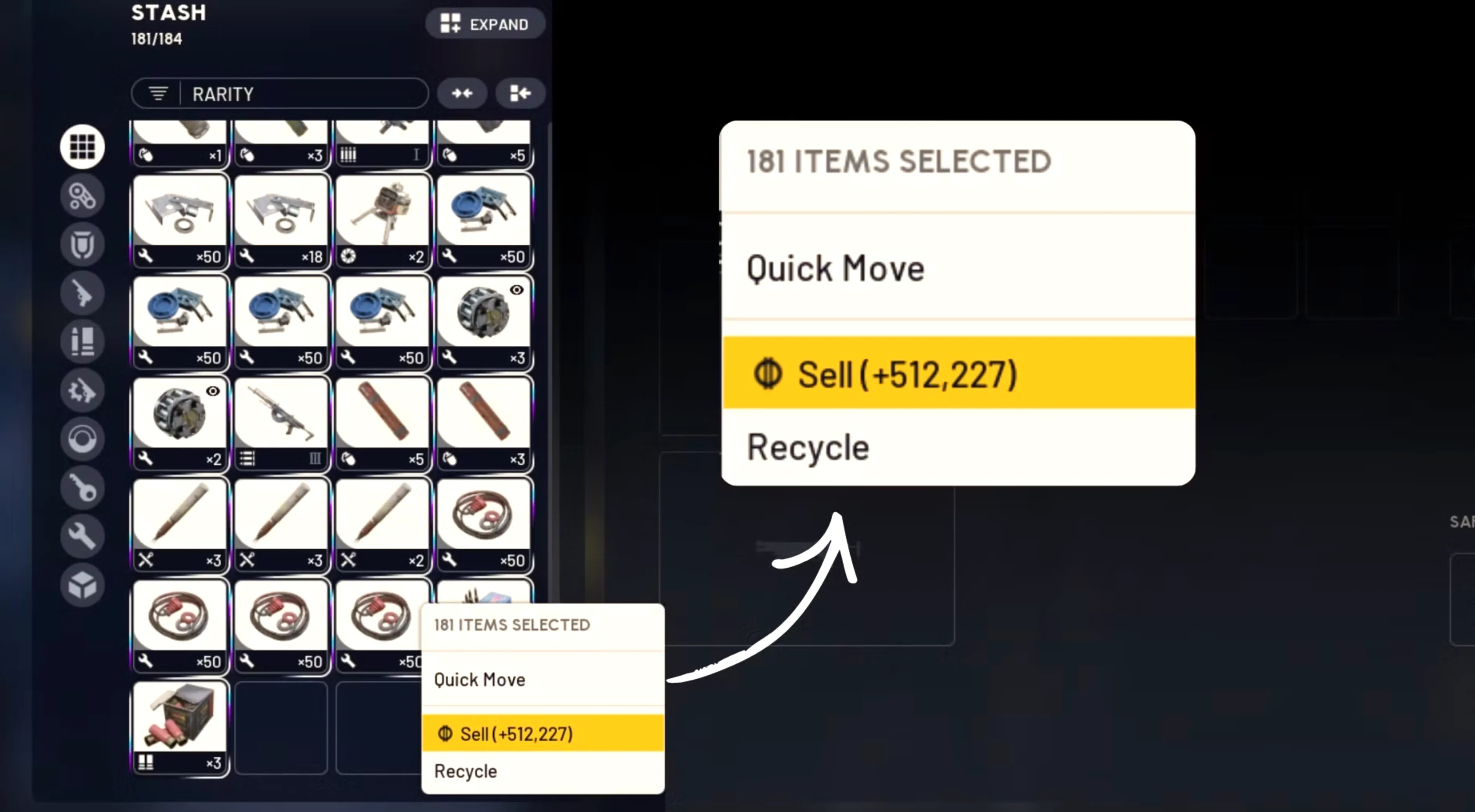
Right now, the only reliable in-game way to calculate your stash value in ARC Raiders is by selecting your entire inventory and checking the combined sell price. This uses the multi-select feature and works on both console and PC.
On Console (PlayStation & Xbox):
Open your inventory and switch to the All tab so every item is visible. Hold L2 on PlayStation or LT on Xbox to enable multi-selection, then select each item using X (PlayStation) or A (Xbox). Once everything is highlighted, press Triangle on PlayStation or Y on Xbox to open the sell menu. The number shown next to the Sell option is the total coin value of your entire stash.
On PC:
Go to your inventory and select the All tab from the left-hand menu. Hold CTRL, then left-click to select every item in your stash. After everything is selected, right-click, and the game will display the total sell value of your inventory.
This method gives you a clear picture of how much your stash is worth, which is especially useful when planning Expedition projects or deciding what items are worth keeping versus selling.
The Date Trick To View Stash Value
There’s also a faster method that some ARC Raiders players use to instantly view their stash value, and it involves adjusting your system date on PC. This workaround was originally shared by players in the community and can save a lot of time compared to manually selecting every item in your inventory.
To use this method, start by launching ARC Raiders as normal. Then open your Windows Time & Language settings and head to the Date & Time section. Turn off the option that automatically sets the date, and manually change it to a day that falls within an active Expedition period (for the current project, this would be between December 17 and December 22). After adjusting the date, return to the game and open the Projects menu.
If done correctly, your total stash value will appear directly next to your coin balance. This makes it much easier to check how much your inventory is worth at a glance, especially if you’re holding a large number of items. While this trick is quicker, keep in mind that it’s an unofficial workaround, so results may vary depending on updates or changes to how Expedition projects function.
Why Stash Value Matters in ARC Raiders?
Knowing how much your stash is worth plays a big role in long-term progression in ARC Raiders. After the first Expedition was postponed, Embark Studios confirmed that players who extract a total of five million coins can unlock five permanent skill points. These skill points carry over permanently and give you a meaningful advantage in future runs.
This means it’s not just about what you’re currently holding, but also the total value you’ve earned over time. If your stash alone reaches five million coins—or if you’ve already extracted that amount across your account—you’ll be able to unlock all available permanent skill points. Because of this, many players keep a close eye on their stash value to track progress, plan extractions, and make smarter decisions about when to sell or hold onto valuable items.
How Expeditions Impact Your Stash Value in ARC Raiders
Leaving during an active Expedition has a major effect on your stash in ARC Raiders. When you choose to depart, your entire inventory is wiped, and your stash value is reset back to zero. This means all stored items are lost, along with any stash size upgrades you unlocked during that Expedition.
In return, a successful departure rewards you with twelve permanent stash slots that carry over to future Expeditions. While losing your inventory can feel punishing, these permanent slots help improve long-term storage capacity and make future progress easier. Because of this reset mechanic, knowing your stash value before departing is important for deciding the best time to extract and maximize your overall progression.
Conclusion
Knowing how to check your stash value in ARC Raiders gives you a clear advantage when planning Expeditions and long-term progression. Whether you use the manual multi-select method or the quicker date workaround on PC, tracking your inventory’s total worth helps you decide when to extract, sell items, or push for key milestones. Since stash value directly affects permanent upgrades and skill point rewards, staying aware of it ensures you don’t waste progress or extract at the wrong time. With the right timing and planning, managing your stash value becomes a powerful tool for advancing in ARC Raiders.
Posted On: December 12th, 2025
Recent Articles


Our 1v9 support team is available 24/7 to help you with any questions or issues you may have.
support@1v9.gg


-a6d5b3e156bb.webp)





Loading...
1v9.gg is not endorsed or affiliated by any game developers or publishers.
2026 1v9, All Rights Reserved, Created By Ritesh (riteshsahoo.com)