- Home
Games
 League of Legends
 Valorant
-a6d5b3e156bb.webp) Fortnite
Fortnite Call of Duty
 Clash of Clans
 Counter-Strike 2
 Roblox
 Rainbow Six Siege
 Clash Royale
 Minecraft
 Rocket League
 Dota 2
 Genshin Impact
 Squad Busters
 Rust
Rust Apex Legends
 Pokemon Go
 XDefiant
 LoL: Wild Rift
 Hay Day
 Diablo 4
 FC 25
FC 25 Marvel Rivals
 World of Warcraft
 Destiny 2
 Deadlock
-9ede9dc6b01b.webp) PUBG Mobile
PUBG Mobile The Finals
 Growtopia
 Forza Horizon 5
 Honkai: Star Rail
 Warframe
 8 Ball Pool
 Zenless Zone Zero
 Path of Exile
 Runescape 3
 Raid: Shadow Legends
 Lost Ark
 WoW: Classic Era
 Summoners War
 WoW: Season of Discovery
 WoW Cataclysm
 WoW: Hardcore
 Throne and Liberty
 New World
 Mobile Legends
 Escape From Tarkov
 Path of Exile 2
 Blade Ball
 Fisch
Fisch Pet Simulator 99
 Pets Go
-d8bcef7708c7.webp) One Piece Bounty
One Piece Bounty Anime Adventures
 Blox Fruits
 Adopt Me
 Murder Mystery 2
 Fragpunk
 Wuthering Waves
 Teamfight Tactics
 Free Fire
 Albion Online
 Black Desert Online
 Honor of Kings
 Brawl Stars
 Arena of Valor
 Call of Duty: Mobile
 Rematch
 Steal a Brainrot
 Grow a Garden
 FC 26
FC 26 Old School Runescape
 Plants vs Brainrots
 Overwatch
 Battlefield
 Arc Raiders
 Dragon Ball Legends
 Fallout 76
 Jailbreak
 Type Soul
 GPO
GPO DonutSMP
 Escape Tsunami For Brainrots
 Watcher of Realms
 Roblox Rivals
 2XKO
2XKO Sailor Piece
 Forza Horizon 6
 GTA 5
GTA 5- Lootboxes
- Become Affiliate
- Blog
- Contact Us
- Sign In

How to Trade in Roblox: Complete Guide
Roblox trading is one of the most popular features for players who enjoy collecting, flipping, and upgrading limited items. It allows users to exchange limited accessories, Robux, and other tradable cosmetics directly with other players, creating a full player-driven economy inside the platform. While many Roblox games have their own internal systems, official Roblox trading works at the account level and is especially important for limited item collectors.
In this guide, you’ll learn exactly how trading works in Roblox, what you need before you can start trading, how to send and accept trades step by step, and how item values are determined. We’ll also cover common mistakes, scam tactics to watch out for, and practical tips to trade safely so you don’t lose Robux or valuable limiteds. Whether you’re new to trading or looking to improve your deals, this article breaks everything down in a clear, beginner-friendly way.
Roblox Trading Requirements
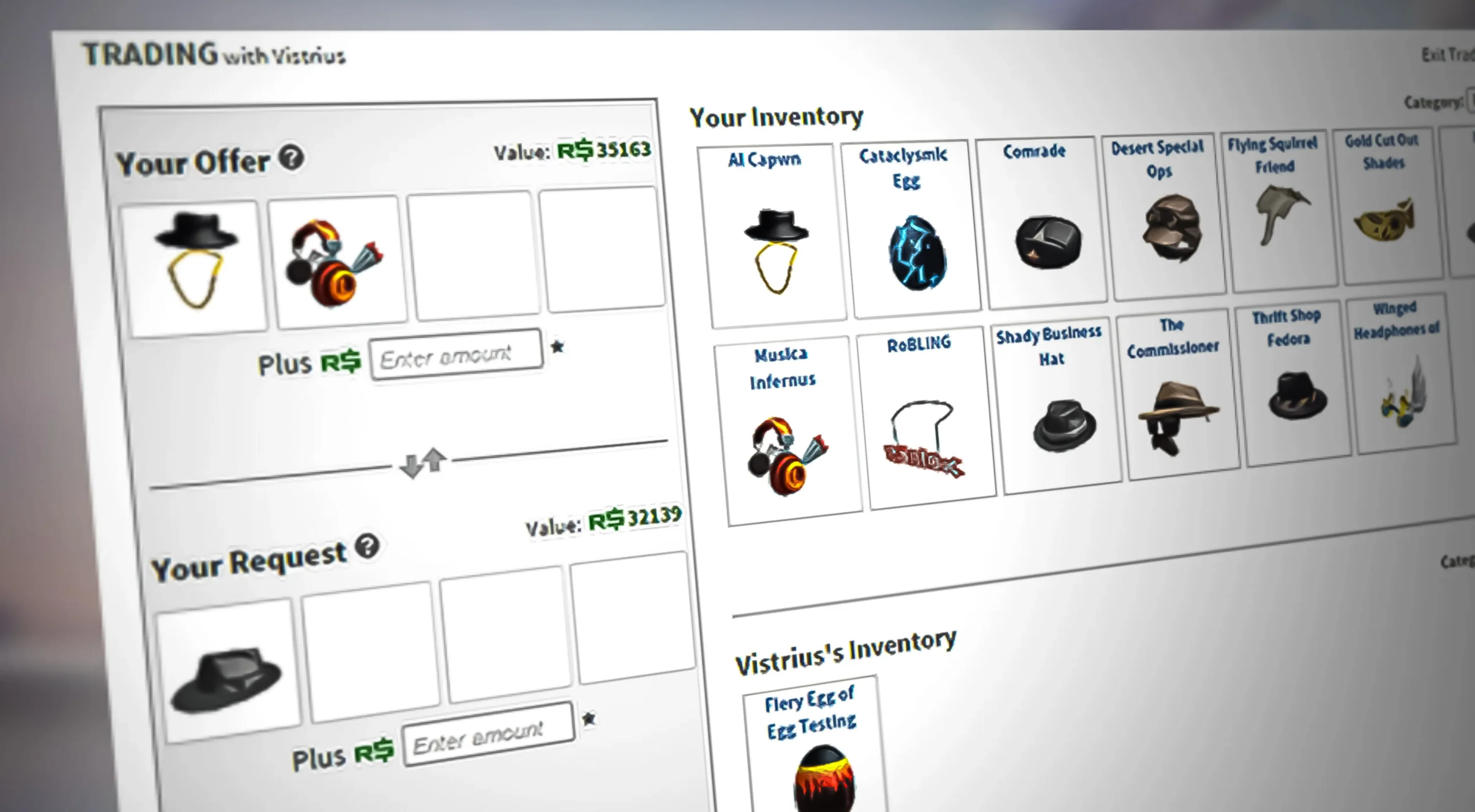
Before you can start trading in Roblox, there are a few requirements you need to meet. Trading is locked behind Roblox Premium, which currently costs $4.99 per month. Without an active Premium subscription, you won’t be able to send or receive trades at all. It’s also important to know that only limited items created by Roblox are tradable. User-generated content (UGC) items cannot be traded, even if they are limited.
To turn trading on for your account, head to your account settings, open the Privacy section, and scroll down to Other Settings. From there, you’ll find the option that controls who can trade with you. You can choose to allow trade requests from everyone, only friends, followers, or disable trading entirely. Once this setting is enabled, Roblox will automatically highlight which items in your inventory are eligible for trading, so you can clearly see what can and can’t be exchanged. After that, you’re ready to start sending and receiving trades with other Premium members.
How to Send a Trade in Roblox
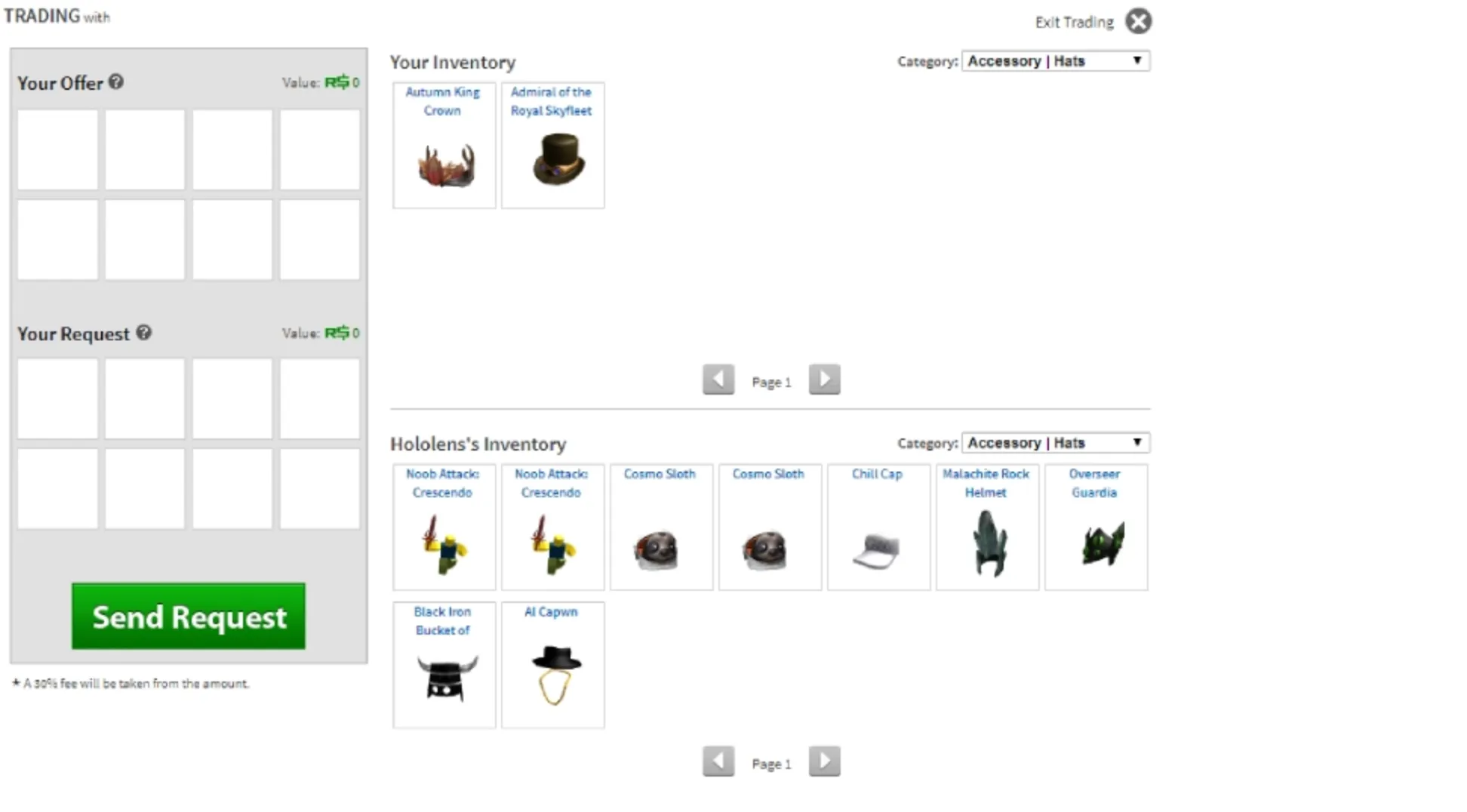
To send a trade in Roblox, start by going to the profile of another player who also has Roblox Premium. Click the three-dot menu on their profile and choose Trade Items. Before the trade window opens, make sure Two-Factor Authentication is enabled on your account, as Roblox requires it for all trading activity.
Once inside the trade screen, you’ll see two separate panels. One side is for the items you’re offering from your own inventory, and the other side is for the items you want in return. Some limited items may display a temporary holding symbol, which means they can’t be traded yet. This usually happens after an item was recently bought or traded and typically lasts up to 48 hours.
You can also add Robux to a trade by entering an amount in the Robux field. Keep in mind that Roblox applies a 30% marketplace fee to Robux included in trades. For example, if you offer 50 Robux, the other player will receive 35 after the fee is deducted. Always double-check the trade details before sending it to make sure the values and items are exactly what you intended.
Roblox Trading Tips
The trading hub is where you keep track of everything related to your deals. The Outbound tab shows trades you’ve sent, Inbound lists offers you’ve received, Completed contains successful trades, and Inactive includes offers that were declined or expired. Checking these sections regularly helps you stay organized and avoid missing good opportunities.
Before purchasing anything from the marketplace, always confirm that the item can actually be traded. Not every Roblox-created item is eligible for player trading, and buying something untradeable can lock your Robux into an item you can’t flip later unless you plan to keep it long-term.
Starting with around 1,000 Robux is a smart baseline if you’re serious about trading. It gives you enough flexibility to avoid filling your inventory with low-value items and instead focus on higher-quality trades that have better growth potential.
Item values are driven by the community and change often. What’s worth a certain amount today might rise or drop tomorrow based on demand, supply, or hype. Keeping an eye on value trends is key if you want to make informed trades and avoid losing Robux on bad deals.
Serial numbers also matter more than many new traders realize. Limited items have unique serials that show when they were originally obtained. Lower serials, especially single-digit or clean numbers, are usually more desirable and can significantly increase an item’s trade value.
Finally, be careful with overpaying. Paying a bit extra can make sense if you really want an item for personal use, but if your goal is profit, overpaying only works when you’re confident the item’s value will rise enough to cover the difference. Smart, patient trades almost always outperform rushed ones
FAQs
Do you need Roblox Premium to trade items?
Yes, trading on Roblox is locked behind a Premium subscription. Both the player sending the trade and the player receiving it must have an active Premium membership. On top of that, only specific Roblox-created limited items are eligible for trading, while UGC items cannot be exchanged between players.
Can you send Robux to another player?
You can include Robux in a trade offer, but it isn’t a direct transfer. Roblox applies a 30% marketplace fee to all Robux traded. For example, if you add 100 Robux to a trade, the other player will receive 70 Robux after the fee is taken.
Are all limited items tradable on Roblox?
No, not every limited item can be traded. Some Roblox-made items are marked as untradeable, and any UGC limiteds are completely excluded from player-to-player trading. Always check an item’s details before buying it if your goal is trading.
How long is the trade hold on Roblox items?
Certain items are temporarily locked after being obtained and can’t be traded right away. This holding period usually lasts up to two days. Once the hold expires, the item becomes eligible for trading.
Is Two-Factor Authentication required for trading?
Yes, 2FA must be enabled on your account to send or receive trades. This extra security step helps protect players from account theft and unauthorized trades, and trading won’t work without it enabled.
Conclusion
Roblox trading can be a powerful way to build your inventory, collect rare limited items, and grow your Robux value over time, but it only works if you understand how the system functions. From meeting the Premium and security requirements to learning how item values, serial numbers, and trade holds affect each deal, every step matters. By enabling the right settings, trading carefully with other Premium members, and staying aware of market trends and common scams, you can trade confidently and avoid costly mistakes. Whether you’re just starting out or aiming to become a serious trader, following a structured, patient approach is the key to long-term success in Roblox trading.
Posted On: January 27th, 2026
Recent Articles


Our 1v9 support team is available 24/7 to help you with any questions or issues you may have.
support@1v9.gg
Loading...
1v9.gg is not endorsed or affiliated by any game developers or publishers.
2026 1v9, All Rights Reserved, Created By Ritesh (riteshsahoo.com)