

How to Recover Your Call of Duty Account (2026)
Your Call of Duty account is tied to your Activision profile, which holds all your progress, unlocks, skins, and purchases across different games. If you lose access to it, whether it’s from a forgotten password, lost email access, or your account getting hacked, it can feel like everything is gone.
The good thing is that Activision does provide ways to recover your account, but the process can take a bit of time if you don’t follow the right steps. Knowing exactly what to do from the start can make a big difference and help you get your account back faster.
In this guide, we’ll go through all the main ways to recover your Call of Duty account, including simple fixes like resetting your password and more serious cases like recovering a hacked account through Activision support.
How to Get Your Hacked Call of Duty Account Back
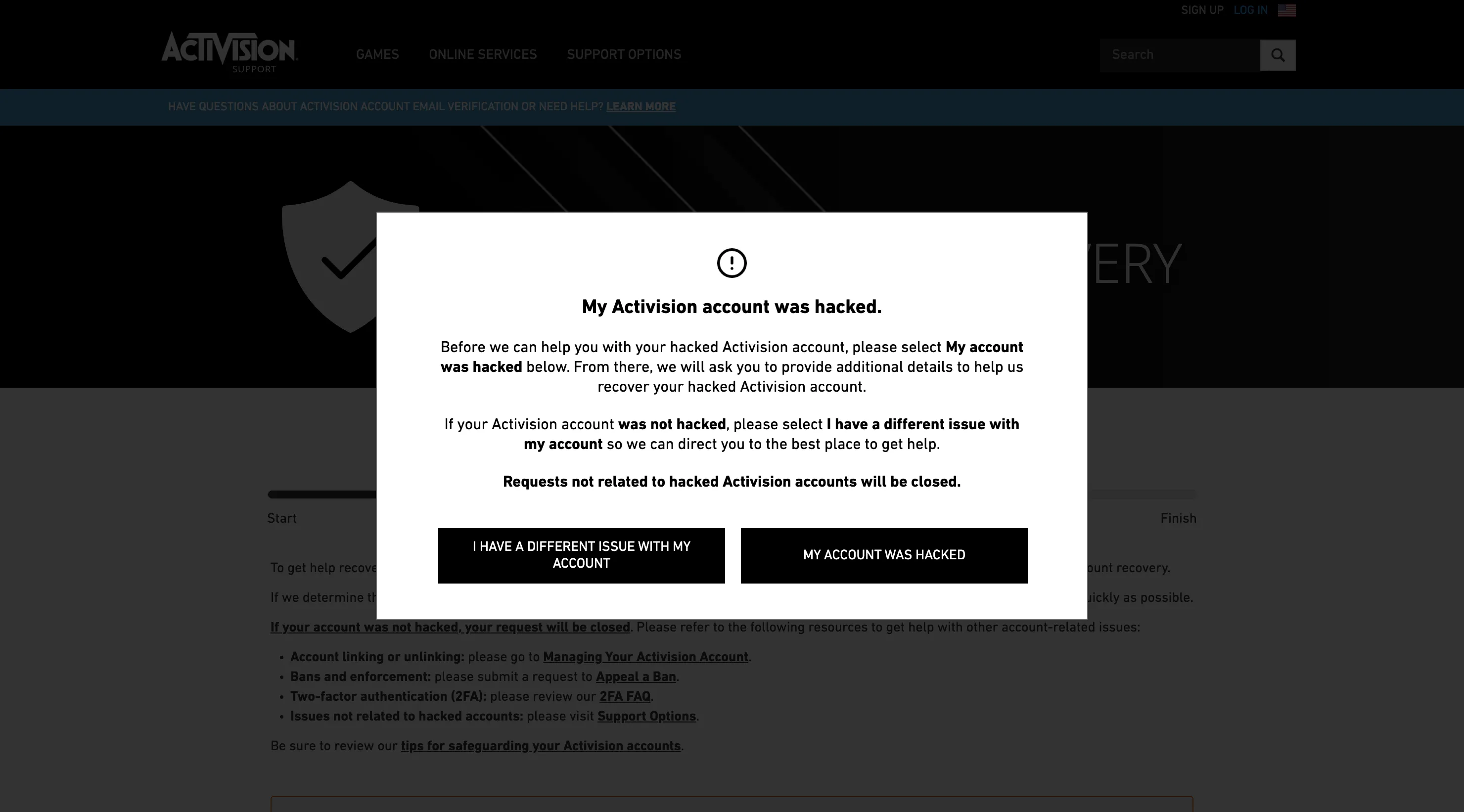
If your Call of Duty account has been taken over and your login details were changed, a normal password reset usually won’t help. In this situation, you’ll need to go through Activision’s official account recovery system, which is designed specifically for hacked accounts.
To start the process, head over to Activision’s account recovery page and choose the option that your account was hacked. You’ll then be asked what kind of issue happened, whether your email was changed, an unknown account was linked, or your account was fully taken over.
From there, Activision will have you create a temporary account using a new email. This is only used to submit your request and communicate with support. After that, you’ll need to link one of your original platform accounts, like PlayStation, Xbox, Steam, or Battle.net, that was previously connected to your hacked profile. This step is important because it helps prove that you’re the real owner.
Once everything is filled out, submit the request and wait for a response. Most cases are reviewed within a couple of days, and you’ll get updates through email. If Activision confirms that your account was compromised, they’ll work on restoring your original account, including your progress, stats, and unlocked content.
One important thing to keep in mind is not to use the temporary account for anything beyond the recovery process. Any progress or purchases made there won’t transfer back to your main account once it’s restored.
How to Change Your Call of Duty Password
If you still have access to the email linked to your Activision account, resetting your password is quick and easy. The system will send you a reset link, which lets you create a new password and regain access to your account. Just keep in mind that the link is only valid for a limited time, so it’s best to use it right away.
To reset your password, go to the official Call of Duty account page and select the “Forgot Password” option. Enter the email connected to your account, then check your inbox for the reset email. Once you open it, follow the link and choose a new password to secure your account again.
If you don’t see the email, it’s worth checking your spam or promotions folder, since it can sometimes end up there.
However, if you no longer have access to the email tied to your account, this method won’t work. In that case, you’ll need to go through the account recovery process instead. Activision usually won’t change account details without proper verification, so using the hacked account recovery option is the best way to regain access in those situations.
How to Secure Your Call of Duty Account After Recovery
Getting your Call of Duty account back is only the first step. The next thing you should do is lock it down so the same situation doesn’t happen again. A lot of accounts get compromised more than once simply because basic security steps weren’t updated after recovery.
Start by enabling two-factor authentication (2FA) on your Activision account. This adds an extra layer of protection, so even if someone gets your password, they still won’t be able to log in without the verification code.
Next, make sure your email is up to date and fully under your control. Avoid using old, inactive, or work-related emails that you could lose access to later. Your email is the main way to recover your account, so keeping it secure is just as important as your password.
It’s also a good idea to check all linked accounts, like PlayStation, Xbox, Steam, or Battle.net. If you see anything you don’t recognize, remove it right away. This helps prevent someone else from keeping access through a linked platform.
Finally, set a strong password that you don’t use anywhere else. Reusing passwords across different sites is one of the most common ways accounts get compromised.
These steps only take a few minutes, but they make a huge difference in keeping your account safe long-term.
Conclusion
Losing access to your Call of Duty account can be stressful, especially when it holds all your progress, unlocks, and purchases. The good news is that there are clear ways to recover it, whether you’re dealing with a forgotten password or a full account takeover.
The most important thing is choosing the right method based on your situation. Simple issues can be fixed quickly with a password reset, while hacked accounts require going through Activision’s recovery system. Following the correct steps from the start can save you a lot of time and increase your chances of getting everything back.
Once you regain access, securing your account should be your top priority. Updating your password, enabling 2FA, and checking linked accounts can help make sure you don’t run into the same problem again.
In the end, as long as you act quickly and follow the proper process, recovering your Call of Duty account is very possible, and you can get back to playing without losing everything you’ve built.
Posted On: March 21st, 2026
Recent Articles


Our 1v9 support team is available 24/7 to help you with any questions or issues you may have.
support@1v9.gg


-a6d5b3e156bb.webp)





Loading...
1v9.gg is not endorsed or affiliated by any game developers or publishers.
2026 1v9, All Rights Reserved, Created By Ritesh (riteshsahoo.com)