- Home
Games
 League of Legends
 Valorant
-a6d5b3e156bb.webp) Fortnite
Fortnite Call of Duty
 Clash of Clans
 Counter-Strike 2
 Roblox
 Rainbow Six Siege
 Clash Royale
 Minecraft
 Rocket League
 Dota 2
 Genshin Impact
 Squad Busters
 Rust
Rust Apex Legends
 Pokemon Go
 XDefiant
 LoL: Wild Rift
 Hay Day
 Diablo 4
 FC 25
FC 25 Marvel Rivals
 World of Warcraft
 Destiny 2
 Deadlock
-9ede9dc6b01b.webp) PUBG Mobile
PUBG Mobile The Finals
 Growtopia
 Forza Horizon 5
 Honkai: Star Rail
 Warframe
 8 Ball Pool
 Zenless Zone Zero
 Path of Exile
 Runescape 3
 Raid: Shadow Legends
 Lost Ark
 WoW: Classic Era
 Summoners War
 WoW: Season of Discovery
 WoW Cataclysm
 WoW: Hardcore
 Throne and Liberty
 New World
 Mobile Legends
 Escape From Tarkov
 Path of Exile 2
 Blade Ball
 Fisch
Fisch Pet Simulator 99
 Pets Go
-d8bcef7708c7.webp) One Piece Bounty
One Piece Bounty Anime Adventures
 Blox Fruits
 Adopt Me
 Murder Mystery 2
 Fragpunk
 Wuthering Waves
 Teamfight Tactics
 Free Fire
 Albion Online
 Black Desert Online
 Honor of Kings
 Brawl Stars
 Arena of Valor
 Call of Duty: Mobile
 Rematch
 Steal a Brainrot
 Grow a Garden
 FC 26
FC 26 Old School Runescape
 Plants vs Brainrots
 Overwatch
 Battlefield
 Arc Raiders
 Dragon Ball Legends
 Fallout 76
 Jailbreak
 Type Soul
 GPO
GPO DonutSMP
 Escape Tsunami For Brainrots
 Watcher of Realms
 Roblox Rivals
 2XKO
2XKO Sailor Piece
 Forza Horizon 6
 GTA 5
GTA 5- Lootboxes
- Become Affiliate
- Blog
- Contact Us
- Sign In


How To Mute and Block Players in Mobile Legends
Toxic teammates, chat spam, and constant arguments can quickly ruin matches in Mobile Legends: Bang Bang, especially during ranked games where players take matches much more seriously. Thankfully, Mobile Legends includes several tools that allow players to mute, block, and report disruptive players to make games far less frustrating.
Whether you want to silence a teammate spamming chat, mute voice communication, or completely block someone from contacting you after a match, the game gives players multiple ways to control their experience.
Learning how to use these features properly can also improve gameplay. Many experienced Mobile Legends players mute distractions during ranked matches because staying focused often leads to better decision-making, stronger teamwork, and more consistent performance.
In this guide, we’ll explain how to mute and block players in Mobile Legends, how each feature works, and the fastest ways to avoid toxic communication while playing ranked or casual matches.
How To Mute Players in Mobile Legends
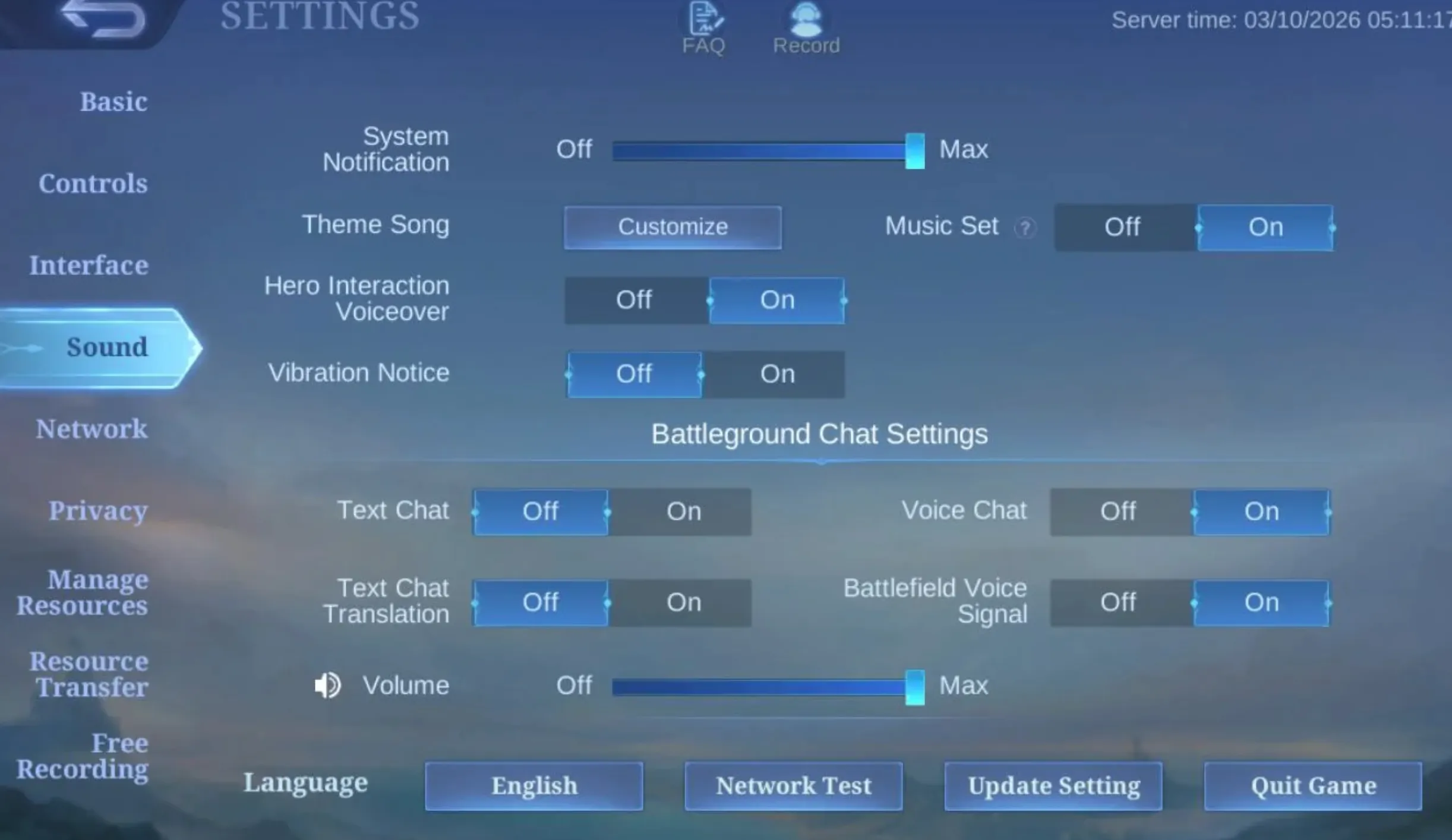
Muting players in Mobile Legends: Bang Bang is one of the easiest ways to avoid toxic chat, voice spam, and unnecessary distractions during matches. Since communication can become very intense during ranked games, knowing how to quickly mute players can make matches much less stressful.
The fastest way to mute someone is during a match through the scoreboard or team menu. Tap the player list icon to open the scoreboard, then select the player you want to mute. From there, you can disable their text chat, voice chat, or both depending on the situation.
If a teammate keeps spamming messages, flaming teammates, or constantly complaining during the game, muting text chat immediately removes their messages from your screen.
Mobile Legends also allows players to mute voice communication separately. This is useful when someone is yelling into the microphone, spamming voice chat, or creating unnecessary distractions during important fights.
Many ranked players prefer muting toxic teammates early instead of arguing during matches because staying focused usually leads to better gameplay and smarter decisions.
The game also includes quick communication tools like pings and preset commands, so muting one player does not completely remove your ability to coordinate with the rest of the team.
Some Mobile Legends players even disable chat entirely during ranked sessions to avoid distractions and maintain focus while climbing ranks.
Using mute features properly can help players:
- Stay calmer during ranked games
- Avoid unnecessary arguments
- Focus more on objectives
- Improve concentration during fights
- Reduce frustration during losing streaks
At higher ranks, mental focus becomes extremely important, and muting toxic communication is often one of the easiest ways to maintain consistent performance throughout long gaming sessions.
How To Block Players in Mobile Legends
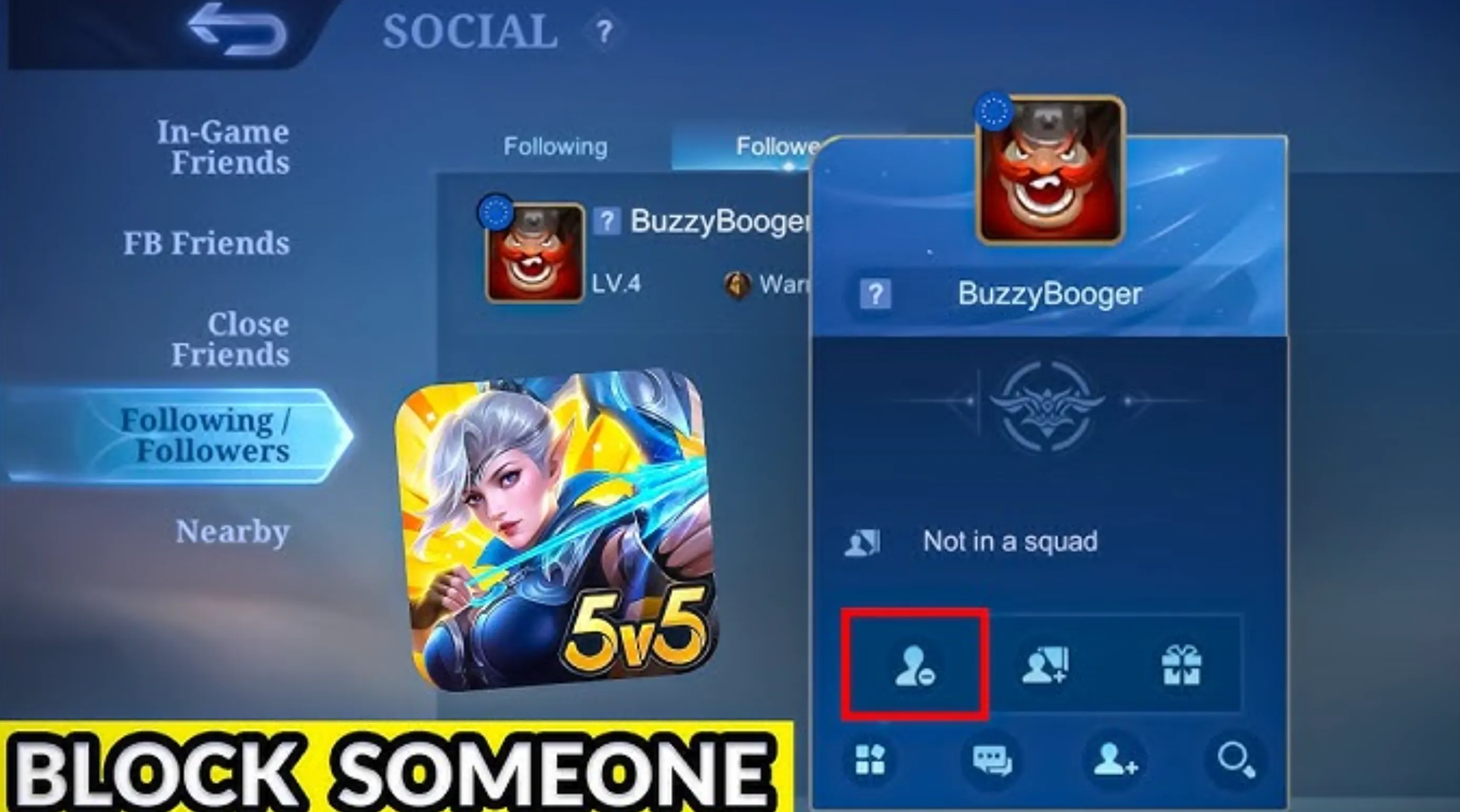
Blocking players in Mobile Legends: Bang Bang prevents them from contacting you through the game’s social features. This is useful if you deal with toxic players, harassment, spam invites, or repeated unwanted messages after matches.
The easiest way to block someone is through the post-match results screen. After finishing a game, tap on the player’s profile, open their account options, and select the block feature. Once blocked, that player will no longer be able to send you direct messages or interact with you normally through the game’s social system.
You can also block players through your recent match history or friends list if you want to manage blocked accounts later on.
What Happens After You Block a Player in Mobile Legends?
When you block someone in Mobile Legends: Bang Bang, the game limits most direct interaction between both accounts. Blocking is mainly designed to stop unwanted communication and make it easier to avoid toxic players outside of matches.
After blocking a player, they usually can no longer:
- Send you private messages
- Add you as a friend
- Invite you to teams or lobbies
- Contact you through normal social features inside the game
This helps reduce harassment, spam invites, and toxic interactions after ranked or casual matches.
However, blocking someone does not completely remove them from matchmaking. Mobile Legends can still place both players into the same game later on because the block system mainly affects communication rather than matchmaking itself.
If you encounter the blocked player again during a match, you can still mute them manually to disable chat and voice communication completely.
Blocking also does not automatically report the player for bad behavior. If someone is trolling, intentionally feeding, cheating, or being abusive, you should still use the report feature after the match ends so the system can review their behavior properly.
Many Mobile Legends players combine:
- Muting during matches
- Blocking after the game
- Reporting toxic behavior
Using all three systems together is one of the best ways to avoid distractions and create a much less frustrating ranked experience overall.
Conclusion
Toxic communication can easily ruin matches in Mobile Legends: Bang Bang, especially during ranked games where emotions become much more intense. Thankfully, the game gives players several tools to mute, block, and report disruptive players to make matches far less stressful.
Whether you want to silence toxic chat, disable voice communication, or completely block someone from contacting you after a match, learning how these systems work can greatly improve your overall experience while playing.
Many experienced Mobile Legends players regularly mute distractions during ranked sessions because staying focused often leads to better teamwork, smarter decisions, and more consistent gameplay overall.
Using the mute, block, and report systems together is one of the best ways to avoid unnecessary arguments, reduce frustration, and keep your attention focused on improving and climbing ranks in Mobile Legends.
Posted On: May 16th, 2026
Recent Articles


Our 1v9 support team is available 24/7 to help you with any questions or issues you may have.
support@1v9.gg
Loading...
1v9.gg is not endorsed or affiliated by any game developers or publishers.
2026 1v9, All Rights Reserved, Created By Ritesh (riteshsahoo.com)