

How to Delete Your Overwatch 2 Account: Step-by-Step Guide
Deleting your Overwatch 2 account is a big decision, especially if you’ve spent time unlocking heroes, skins, and competitive ranks. Some players choose to delete their account to take a permanent break, protect personal data, or move on from Blizzard games entirely. Whatever the reason, the process isn’t as simple as pressing a delete button, and it comes with permanent consequences. In this guide, we’ll walk through how to delete your Overwatch 2 account step by step, explain what happens to your progress and purchases, and cover important things you should know before going through with the request.
How to Delete Your Overwatch 2 Account
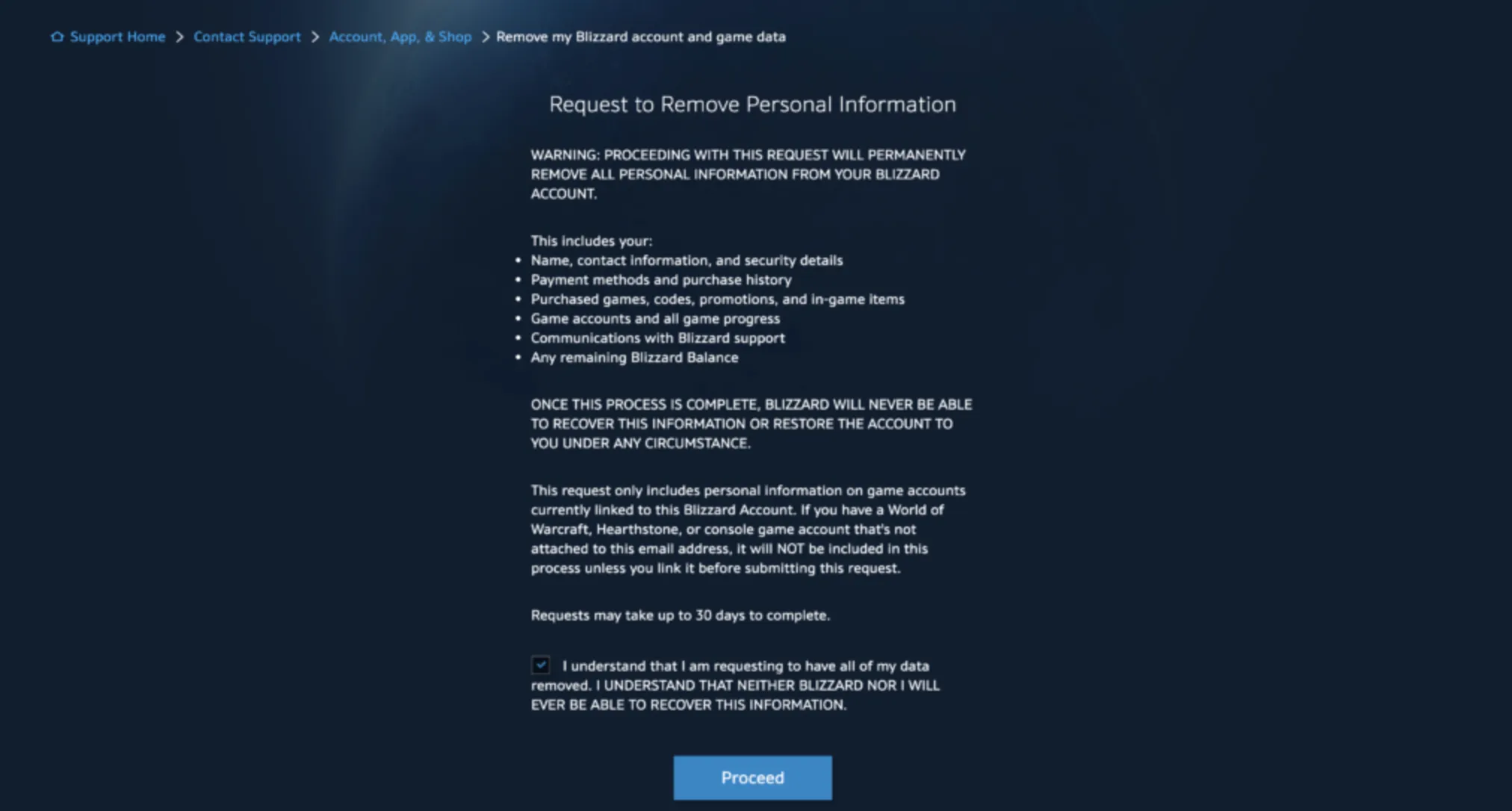
To delete your Overwatch 2 account, you’ll need to go through Blizzard’s account management system, as there is no in-game delete option. Start by logging into your Blizzard account on the official Blizzard website, then open Account Settings and head to the Privacy & Communication or Account Details section. From there, choose the option related to data deletion or account deletion and submit a request. Blizzard will ask you to verify your identity, usually through email confirmation and account details, to make sure you are the rightful owner. Once the request is approved, your Overwatch 2 account, along with all progress, skins, purchases, and linked data, will be permanently removed. This process is irreversible, so it’s important to be 100% sure before completing the request.
Things To Know Before Deleting Your Overwatch 2 Account
Before deleting your Overwatch 2 account, there are a few important things you should fully understand, because this process is permanent and can’t be undone. Once your account is deleted, all progress is wiped, including unlocked heroes, skins, cosmetics, competitive ranks, battle pass rewards, and any in-game purchases you’ve made. You will not be able to recover anything afterward, even if you contact support. Deleting your Overwatch 2 account is also tied to your Blizzard account, which means other Blizzard games linked to the same account (such as World of Warcraft or Diablo) may be affected depending on how you submit the deletion request. The deletion process is not instant—Blizzard usually applies a waiting period to verify ownership, during which you may temporarily lose access before the account is permanently removed. If your account is linked to other platforms like PlayStation, Xbox, or Steam, those connections will be broken, and progress will not transfer to a new account. If your goal is simply to start fresh, consider creating a new Blizzard account instead, as deleting your existing one should only be done if you’re absolutely certain you won’t return.
FAQs
Is deleting my Overwatch 2 account permanent?
Yes. Once the deletion process is completed, your account and all associated data are permanently removed and cannot be restored under any circumstances.
Will deleting my Overwatch 2 account remove my Blizzard account too?
In most cases, deleting Overwatch 2 requires deleting the Blizzard account it’s linked to. This can affect other Blizzard games tied to the same account, so you should review the request carefully before confirming.
Do I lose all skins, heroes, and purchases after deletion?
Yes. All cosmetics, unlocked heroes, battle pass rewards, competitive progress, and paid content are permanently lost once the account is deleted.
How long does it take for an Overwatch 2 account to be deleted?
Account deletion is not instant. Blizzard usually applies a verification and waiting period to confirm ownership before fully removing the account.
Can I create a new Overwatch 2 account after deleting my old one?
Yes. You can start fresh by creating a new Blizzard account, but none of your previous progress or items will transfer to the new account.
Conclusion
Deleting your Overwatch 2 account is a serious and irreversible decision that should only be made after understanding exactly what you’re giving up. From purchased cosmetics and unlocked heroes to competitive progress and account history, everything tied to your Blizzard account will be permanently erased once the process is complete. This guide walks through each step so you know what to expect, how to avoid common mistakes, and when it might be smarter to pause or reconsider. If you’re fully certain about moving on, following the correct deletion process ensures your account is removed safely and without unexpected issues.
Posted On: January 26th, 2026
Recent Articles


Our 1v9 support team is available 24/7 to help you with any questions or issues you may have.
support@1v9.gg


-a6d5b3e156bb.webp)





Loading...
1v9.gg is not endorsed or affiliated by any game developers or publishers.
2026 1v9, All Rights Reserved, Created By Ritesh (riteshsahoo.com)