

How to Create a New Clash Royale Account (2026)
Clash Royale has been around for years, and with all the updates, new cards, and changes, it’s normal for players to want a fresh start or run a second account alongside their main one.
Some players enjoy going through the early game again and climbing from zero, while others prefer having a second account to test new decks without affecting their main progress. No matter the reason, setting up a new account the right way is important so you don’t lose it later.
Everything is managed through Supercell ID, which lets you save and access your accounts across different devices.
In this guide, you’ll learn how to create a new Clash Royale account step by step, how to link it properly, and what to expect during the setup process.
How to Create a New Clash Royale Account
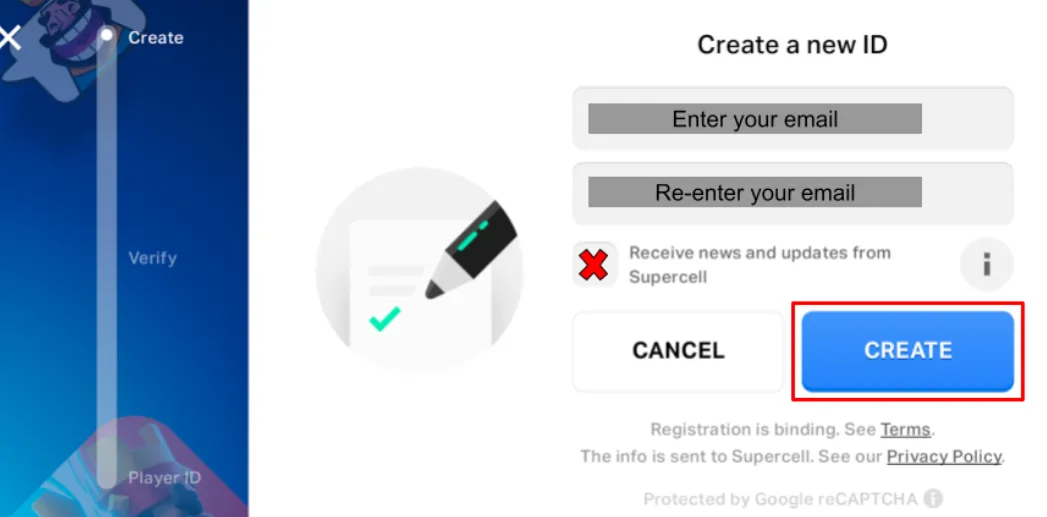
The best way to make a new account in Clash Royale is by using Supercell ID. This makes sure your progress is saved and lets you manage multiple accounts on the same device without losing anything.
Start by opening the game and going into the settings menu. From there, access the Supercell ID section and log out of your current account. Once the game reloads, choose to play without logging in. This will create a brand new account from scratch.
Play through the short tutorial until you unlock the full game. After that, go back into settings and connect the new account to Supercell ID by registering with a different email address.
You’ll receive a verification code in your email, which you need to enter to finish the setup. Once that’s done, your new account is fully saved and ready to use.
How to Create an Clash Royale Account Without a Supercell ID
It’s possible to start playing Clash Royale without connecting to Supercell ID, but it’s not the safest option. If your game gets deleted or your device resets, your progress can be lost completely.
To create an account this way, simply open the game and choose the option to play without logging into a Supercell ID. From there, go through the tutorial and your new account will be created automatically.
The downside is that this account isn’t backed up. If something happens, recovery becomes difficult and isn’t always guaranteed. You would need to contact support and provide details like your username, level, and any purchases to try and prove ownership.
For that reason, it’s always recommended to link your account to a Supercell ID as soon as possible, so your progress stays protected and can be accessed on any device.
Conclusion
Creating a new Clash Royale account is simple once you understand how Supercell ID works. Whether you want a fresh start or a second account to try new strategies, setting it up the right way ensures you won’t lose your progress later.
Using Supercell ID is always the safest option, since it keeps your account saved and lets you switch between devices or multiple accounts without any issues. While it’s possible to play without it, the risk of losing everything makes it not worth it long term.
As long as you follow the right steps and link your account properly, you’ll be able to manage your progress easily and enjoy the game without worrying about losing access.
Posted On: April 9th, 2026
Recent Articles


Our 1v9 support team is available 24/7 to help you with any questions or issues you may have.
support@1v9.gg


-a6d5b3e156bb.webp)





Loading...
1v9.gg is not endorsed or affiliated by any game developers or publishers.
2026 1v9, All Rights Reserved, Created By Ritesh (riteshsahoo.com)