- Home
Games
 League of Legends
 Valorant
-a6d5b3e156bb.webp) Fortnite
Fortnite Call of Duty
 Clash of Clans
 Counter-Strike 2
 Roblox
 Rainbow Six Siege
 Clash Royale
 Minecraft
 Rocket League
 Dota 2
 Genshin Impact
 Squad Busters
 Rust
Rust Apex Legends
 Pokemon Go
 XDefiant
 LoL: Wild Rift
 Hay Day
 Diablo 4
 FC 25
FC 25 Marvel Rivals
 World of Warcraft
 Destiny 2
 Deadlock
-9ede9dc6b01b.webp) PUBG Mobile
PUBG Mobile The Finals
 Growtopia
 Forza Horizon 5
 Honkai: Star Rail
 Warframe
 8 Ball Pool
 Zenless Zone Zero
 Path of Exile
 Runescape 3
 Raid: Shadow Legends
 Lost Ark
 WoW: Classic Era
 Summoners War
 WoW: Season of Discovery
 WoW Cataclysm
 WoW: Hardcore
 Throne and Liberty
 New World
 Mobile Legends
 Escape From Tarkov
 Path of Exile 2
 Blade Ball
 Fisch
Fisch Pet Simulator 99
 Pets Go
-d8bcef7708c7.webp) One Piece Bounty
One Piece Bounty Anime Adventures
 Blox Fruits
 Adopt Me
 Murder Mystery 2
 Fragpunk
 Wuthering Waves
 Teamfight Tactics
 Free Fire
 Albion Online
 Black Desert Online
 Honor of Kings
 Brawl Stars
 Arena of Valor
 Call of Duty: Mobile
 Rematch
 Steal a Brainrot
 Grow a Garden
 FC 26
FC 26 Old School Runescape
 Plants vs Brainrots
 Overwatch
 Battlefield
 Arc Raiders
 Dragon Ball Legends
 Fallout 76
 Jailbreak
 Type Soul
 GPO
GPO DonutSMP
 Escape Tsunami For Brainrots
 Watcher of Realms
 Roblox Rivals
 2XKO
2XKO Sailor Piece
 Forza Horizon 6
 GTA 5
GTA 5- Lootboxes
- Become Affiliate
- Blog
- Contact Us
- Sign In


How To Get a Custom Crosshair in Fortnite
A clean crosshair can make a bigger difference in Fortnite than most players realize. Whether you’re trying to line up cleaner shotgun shots, track targets more easily, or just reduce visual clutter, changing your crosshair can instantly improve how comfortable the game feels. While Fortnite doesn’t offer full crosshair customization inside the game itself, there are still a few reliable ways to set up a custom crosshair using built-in settings, platform features, or safe third-party tools. In this step-by-step guide, we’ll break down exactly how to get a custom crosshair in Fortnite, explain the available options on PC and console, and help you choose the setup that fits your playstyle best without risking your account.
How To Customize Your Crosshair in Fortnite
At the moment, Fortnite doesn’t include built-in custom crosshair options you can tweak inside the settings menu. That means players can’t change crosshair size, color, or shape directly in-game. Still, there are a couple of easy workarounds depending on the platform you play on.
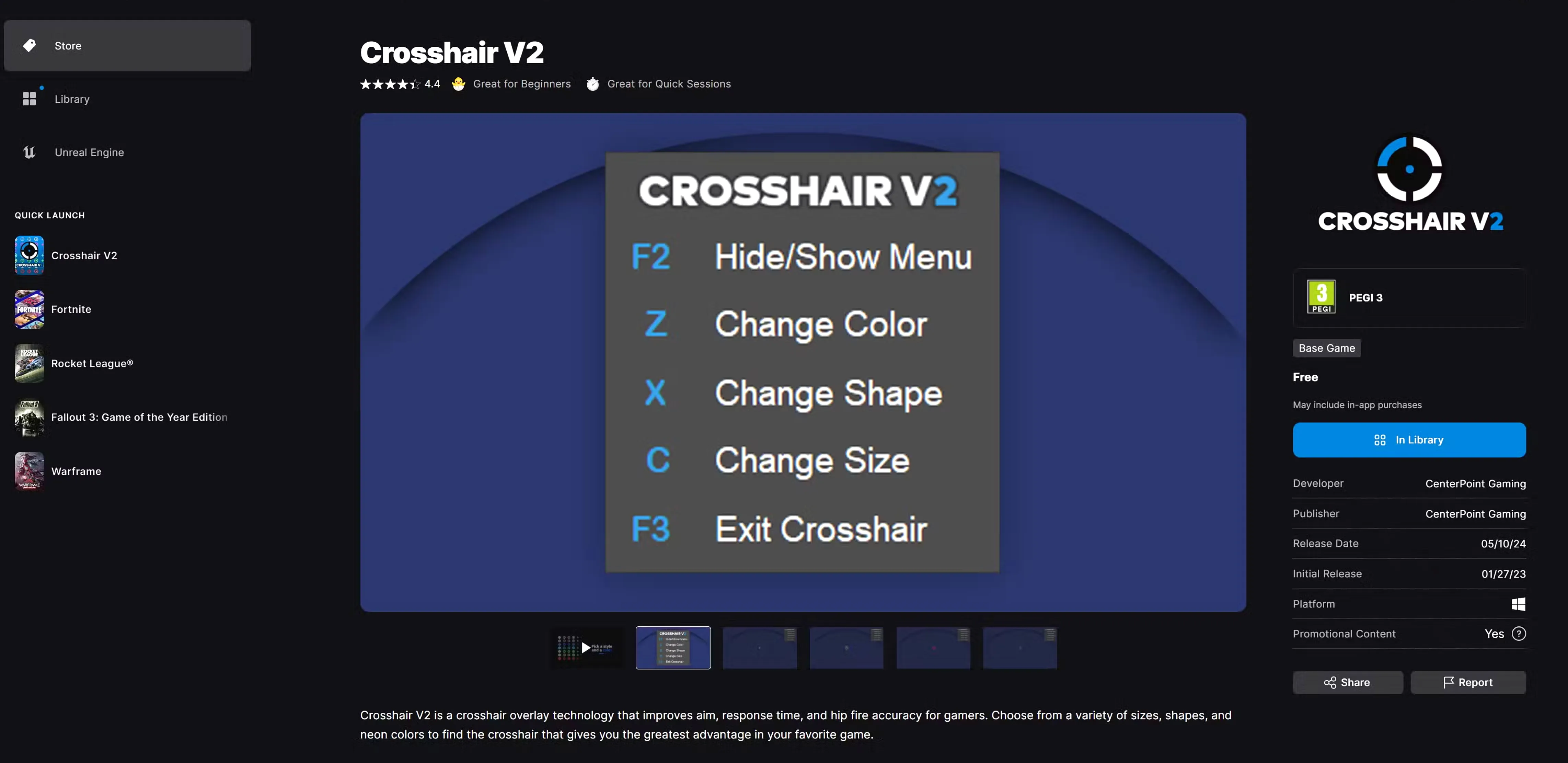
For PC players, the best option is using third-party crosshair tools. Two of the most popular choices available on the Epic Games Store are Crosshair V2 and Crosshair X. Crosshair V2 is completely free and offers simple, lightweight crosshair overlays that work well without impacting performance. Crosshair X, while paid at $7.99, gives more advanced customization like animated crosshairs, color presets, and fine-tuned sizing, making it a solid pick for competitive players who want more control.
Console players don’t have software options like PC users, but there’s still a solution. Many gaming monitors come with built-in crosshair overlays that can be enabled through the monitor’s settings menu. While these aren’t as flexible as PC apps, they still help improve aim consistency, especially in close-range fights. Together, these options make it possible to use a custom crosshair in Fortnite even without native in-game support.
How To Get a Custom Crosshair in Fortnite Using Crosshair V2
If you want a simple and lightweight way to add a custom crosshair in Fortnite, Crosshair V2 is one of the easiest tools to use. Before launching the app, you’ll first want to turn off Fortnite’s default reticle so the custom crosshair doesn’t overlap. To do this, open Fortnite, go to Settings, switch to the Game UI tab, and toggle the Reticle option to Off. Once that’s done, close the settings menu.
Next, open Crosshair V2 from the Epic Games Store. As soon as the app launches, a basic crosshair will appear in the center of your screen automatically. You can fully tweak it while in-game using simple hotkeys: press Z to change the color, C to adjust the size, and X to swap between different crosshair shapes. These shortcuts make it easy to fine-tune the crosshair on the fly until it feels just right for your aim.
Crosshair V2 does need to stay running in the background for the crosshair to remain visible, but you can press F2 to hide the app’s menu so it doesn’t distract you while playing. Overall, it’s a fast, no-nonsense solution for players who want better visual aim support without spending money. If you’re looking for even deeper customization options later on, you can upgrade to Crosshair X directly through Crosshair V2 or download it separately from the Epic Games Store.
Conclusion
Getting a custom crosshair in Fortnite can make a real difference, especially if you care about clean aim and better shot consistency. While Fortnite doesn’t offer built-in crosshair customization, PC players still have solid options through trusted third-party tools like Crosshair V2 or Crosshair X. These tools are easy to set up, safe to use, and let you tweak color, size, and shape until the crosshair feels right for your playstyle. Console players are a bit more limited, but monitor-based crosshairs can still help. In the end, a custom crosshair won’t magically make you cracked, but it can definitely make aiming feel more comfortable and consistent once you find the setup that works best for you.
Posted On: December 27th, 2025
Recent Articles


Our 1v9 support team is available 24/7 to help you with any questions or issues you may have.
support@1v9.gg
Loading...
1v9.gg is not endorsed or affiliated by any game developers or publishers.
2026 1v9, All Rights Reserved, Created By Ritesh (riteshsahoo.com)