

Best Winter Soldier Crosshair And Reticle Code Settings
If you’re playing Winter Soldier in Marvel Rivals, your crosshair and hero settings can directly affect how consistent your aim feels. Winter Soldier rewards players who can land accurate mid-range shots, track targets cleanly, and react quickly during chaotic fights. A messy reticle or unstable sensitivity can easily throw off your rhythm.
That’s why having an optimized Winter Soldier crosshair and properly tuned settings is important. The right setup keeps your screen clear, improves visibility during team fights, and helps you stay precise whether you’re applying pressure or finishing low-health targets.
In this guide, we’ll break down the best Winter Soldier crosshair in Marvel Rivals, provide a reliable reticle code, and go over the ideal hero settings so you can maximize accuracy, control, and consistency in every match.
Best Winter Soldier Crosshair in Marvel Rivals
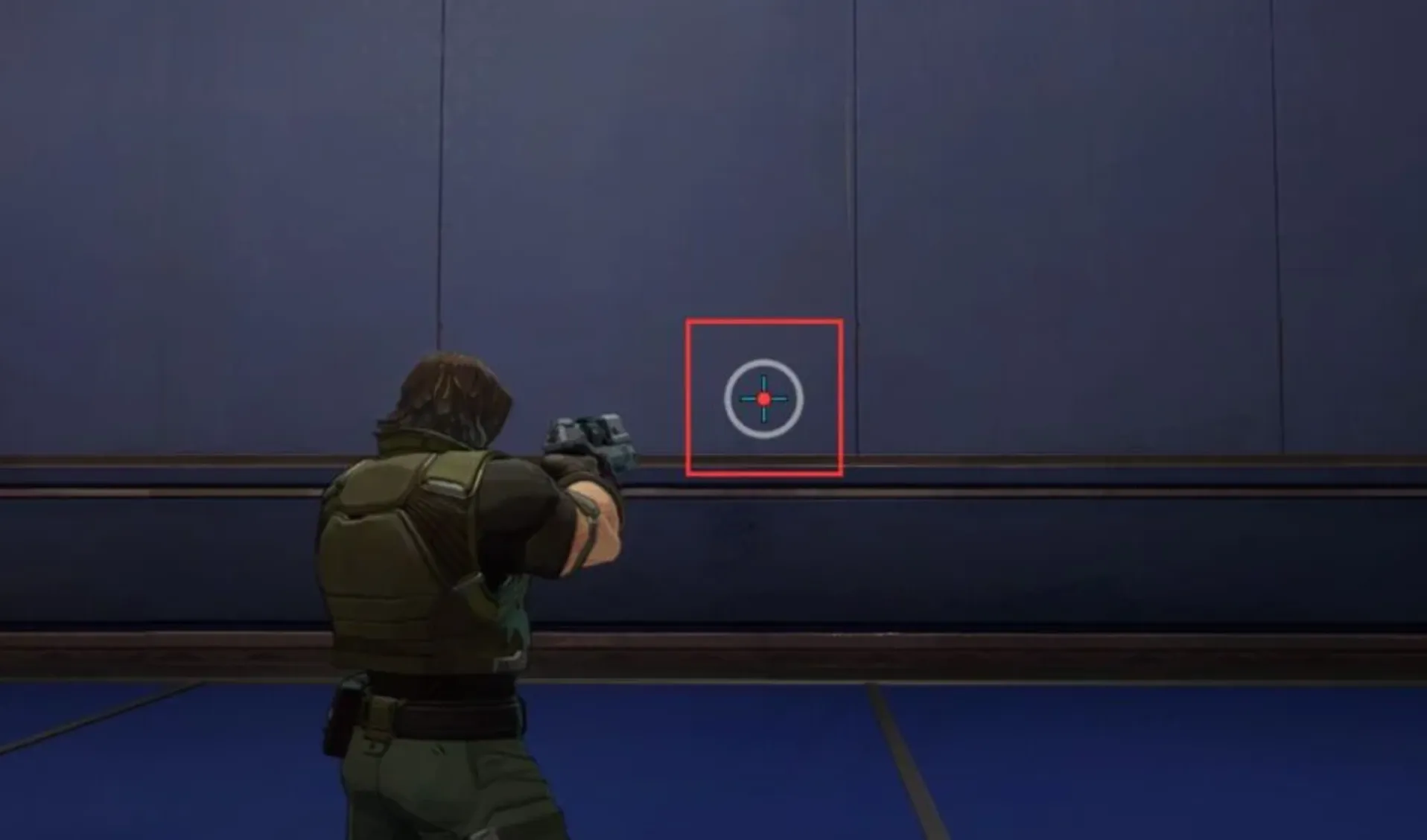
Winter Soldier benefits from a more detailed crosshair compared to close-range heroes. Since his kit mixes mid-range projectile shots with a charged grapple, the ideal setup combines a center dot, crosshair lines, and an outer circle. Each element plays a different role in helping you land shots and secure hooks.
Center Dot
The center dot is your primary aiming reference in most fights. Up to roughly 25–30 meters, you can rely almost entirely on this dot for accurate tracking. Winter Soldier’s projectile speed is high, so at normal engagement distances, you won’t need heavy shot leading. Keeping the dot centered on upper torso level will give you consistent results.
Crosshair Lines
The crosshair lines become useful when fighting at longer distances. Even though Winter Soldier’s projectile travels quickly (around 180 meters per second), extremely long shots still require slight leading against moving enemies.
When targets are 40+ meters away and strafing, use the lines to judge how far to aim ahead of them. They act as visual guides to help you compensate for movement without overcorrecting.
Outer Circle
The outer circle is specifically tied to your Bionic Hook. It visually represents your effective grapple range when fully charged. If any part of the enemy model sits inside that circle and you’re within range, your charged hook will connect — even if your center dot isn’t perfectly on them.
This is especially important because Bionic Hook changes range based on charge time. A quick tap reaches about 10 meters, while holding it for the full charge (around four seconds) extends the range to roughly 20 meters. The circle helps you instantly recognize when a target is hookable without needing to guess.
Why This Setup Works
Winter Soldier isn’t just about raw aim — he’s about converting picks. The dot helps with mid-range precision, the lines support long-distance leading, and the circle gives you grapple awareness.
If you’re looking for the best Winter Soldier crosshair in Marvel Rivals, this multi-element setup gives you both accuracy and utility awareness, helping you land shots consistently and secure more hooks in every fight.
Winter Soldier Reticle Code in Marvel Rivals
If you want to run the exact dot, lines, and circle configuration built for Winter Soldier’s mid-range pressure and Bionic Hook awareness, here is the full reticle string written clearly so you can paste it directly into your settings:
Winter Soldier Reticle Code:
4;0;10.0,0.0,50.0,30.0;100.0,80.0,50.0,100.0;50.0,70.0,0.0,40.0;100.0,100.0,100.0,100.0;0.0,0.0,0.0,20.0;33.0,4.0,53.0,33.0;28.0;100.0,80.0,50.0,100.0;0.0;5,4,5,1;1.0,1.0,1.0;
This Winter Soldier crosshair in Marvel Rivals is designed to balance precision and utility. The center dot supports accurate mid-range tracking, the crosshair lines help with long-distance leading, and the outer circle gives you a clear visual reference for Bionic Hook range.
Unlike simpler reticles, this setup gives you extra spatial awareness. The circle lets you instantly recognize when an enemy is within grapple distance, while the lines assist when adjusting for movement at extended ranges.
If you’re looking for a Winter Soldier reticle that improves both aim consistency and hook timing, this configuration gives you a strong foundation for landing more shots and securing more picks in every match.
Winter Soldier Crosshair Settings in Marvel Rivals
If you want to manually recreate this Winter Soldier crosshair instead of using the reticle code, here’s how to set everything up step by step. This setup is focused on clarity at mid-range while still giving you visual help for long-range shots and Bionic Hook range.
Start by selecting Circle and Crosshair as your reticle type and turn Reticle Animation off to keep the crosshair stable at all times. Stability matters with Winter Soldier since you’ll be taking a lot of controlled shots rather than spraying.
For the center dot, set the Dot Width to 30 and keep Dot Opacity at 100 so it stays sharp and visible in every fight. Add a strong outline by setting Dot Outline Width to 40 with 100 opacity. This makes the dot easy to track even during chaotic team fights. A small Dot Blur around 20 softens it slightly without losing precision.
For the crosshair lines, keep the Crosshair Width at 0, but raise Crosshair Opacity to 80 so they’re visible without overpowering the dot. Set Crosshair Length to 28 and keep the Crosshair Angle at 0 for a clean horizontal and vertical layout. Increase the Crosshair Outline Width to 70 with full opacity so the lines remain visible against bright backgrounds.
Now for the outer circle, set Circle Width to 50 and Circle Opacity to 50. This keeps it semi-transparent so it doesn’t block vision while still acting as a clear Bionic Hook range indicator. Set Circle Radius to 53, leave the outline width at 0, and keep blur at 0 for a sharp edge.
For colors, use Red for the dot, Blue for the crosshair lines, and White for the circle. This color separation helps you instantly recognize which part of the reticle you’re focusing on: red for precision shots, blue for leading, and white for hook spacing.
This Winter Soldier crosshair setup in Marvel Rivals gives you a clean center for accurate aiming, supportive lines for longer shots, and a visible circle to judge grapple range without cluttering your screen.
Conclusion
Finding the best Winter Soldier crosshair in Marvel Rivals can make a noticeable difference in how consistent your shots and grapples feel. A well-balanced setup with a clear center dot, supportive crosshair lines, and a visible outer circle helps you land mid-range shots, lead targets at longer distances, and judge Bionic Hook range more confidently. Instead of guessing distances or overcorrecting your aim, you get a clean visual reference that supports both precision and utility.
Whether you copy the reticle code directly or adjust the settings manually, the goal is simple: improve your tracking, hit more hooks, and stay consistent in fights. Once you get comfortable with this setup, you’ll notice smoother engagements and better control in every match.
Posted On: March 9th, 2026
Recent Articles


Our 1v9 support team is available 24/7 to help you with any questions or issues you may have.
support@1v9.gg


-a6d5b3e156bb.webp)





Loading...
1v9.gg is not endorsed or affiliated by any game developers or publishers.
2026 1v9, All Rights Reserved, Created By Ritesh (riteshsahoo.com)