

Best Rogue Crosshair And Reticle Code Settings
If you’re playing Rogue in Marvel Rivals, your crosshair and hero settings can make a bigger difference than you think. Rogue thrives in close to mid-range fights where quick tracking, clean flicks, and strong target focus matter more than flashy mechanics. A cluttered reticle or unstable sensitivity can easily throw off your aim during fast engagements.
That’s why running an optimized Rogue crosshair and properly tuned settings is essential. The right setup keeps your screen clear, improves visibility during chaotic team fights, and helps you stay consistent whether you’re diving in or holding angles.
In this guide, we’ll break down the best Rogue crosshair, provide a clean reticle code, and go over the ideal hero settings so you can maximize your accuracy and control in every match.
Best Rogue Crosshair in Marvel Rivals
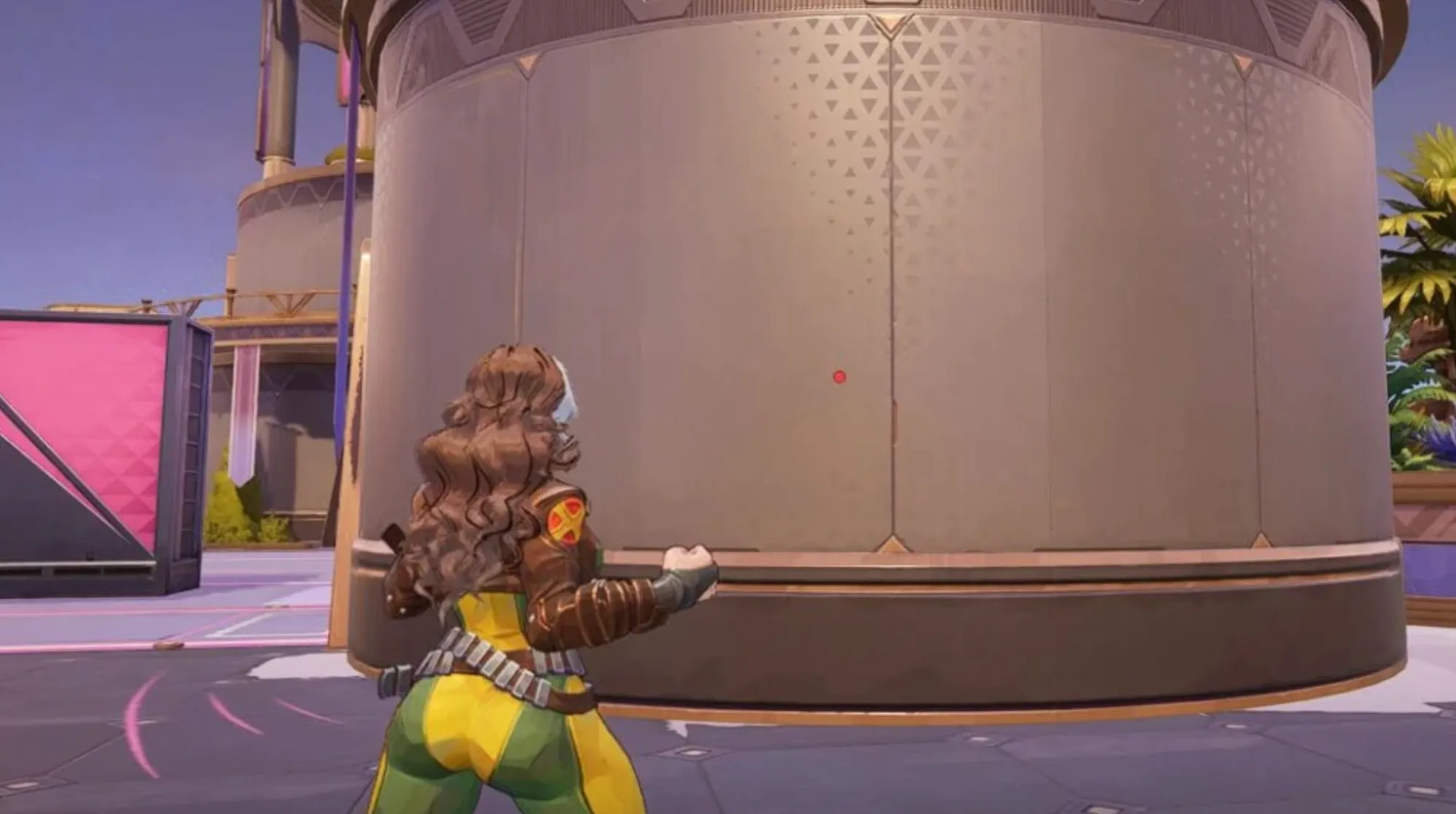
When it comes to choosing the best Rogue crosshair in Marvel Rivals, less is more. Rogue is built around close-range pressure, fast engages, and tight combo execution. Because most of her damage happens right in front of you, there’s no need for a complicated reticle filled with lines, circles, or extra markers.
A small center dot is the most effective option for Rogue. It gives you a clear reference point in the middle of your screen without blocking enemy models during chaotic fights. Since Rogue relies on dashes and melee combos, your goal isn’t pixel-perfect long-range precision — it’s clean positioning and smooth target tracking at close range.
Some players experiment with crosshairs that include extra lines to estimate dash distance, but this often creates unnecessary visual clutter. After a few matches, you’ll naturally develop a feel for Rogue’s engage range and combo spacing. Muscle memory replaces the need for visual indicators.
The reason a simple dot works so well for Rogue is clarity. During fast dives and team fights, you want your screen to stay clean so you can focus on cooldown timing, enemy positioning, and escape routes. A minimal Rogue crosshair keeps your vision sharp and your attention where it matters — executing abilities smoothly and staying one step ahead in every fight.
Rogue Reticle Code in Marvel Rivals
If you want to use the same clean dot setup for Rogue, here’s the full reticle string written in plain format so you can paste it directly into your settings:
Rogue Reticle Code:
1;0;6.0,100.0,0.0,30.0;100.0,0.0,100.0,100.0;50.0,100.0,0.0,0.0;100.0,45.0,100.0,100.0;0.0,0.0,0.0,0.0;33.0,92.0,0.0,33.0;1.0;100.0,0.0,100.0,100.0;0.0;5,3,1,1;0.0,0.0,0.0;
This Rogue crosshair in Marvel Rivals is built around a slightly larger center dot compared to other heroes, which makes it easier to track targets during fast dashes and close-range skirmishes. Because Rogue fights up close and relies on quick combo execution, clarity matters more than extra visual guides.
There are no extra lines, circles, or animated elements in this reticle. That keeps your screen clean when diving into team fights. A minimal dot helps you stay focused on positioning, cooldown timing, and target priority instead of overthinking visual markers.
If you’re looking for the best Rogue crosshair in Marvel Rivals, this setup gives you a clean, distraction-free aiming reference that supports aggressive play while maintaining consistent control in every engagement.
Rogue Crosshair Settings in Marvel Rivals
To get the best results with Rogue, you want a minimal and highly visible dot setup that keeps your screen clear during fast dives and close-range fights. The entire goal of this crosshair configuration is simplicity and consistency.
Start by setting your Reticle Type to Dot and make sure Reticle Animation is turned off. Rogue doesn’t benefit from animated crosshair elements since her gameplay revolves around movement, combos, and quick engages rather than long-range tracking.
Set the Dot Width to 30 so it’s slightly larger and easier to see in chaotic team fights. Keep Dot Opacity at 100 so it stays fully visible at all times. For outlines, leave the Dot Outline Width at 0, but keep the Dot Outline Opacity at 100 to maintain sharp visibility without adding thickness.
All blur settings, including Dot Blur, should remain at 0. You want the dot to look crisp, not faded or soft.
Since this build only uses a center dot, there’s no need to adjust crosshair width, circle width, radius, length, or angle. Those elements are not used in this Rogue setup, which keeps everything clean and distraction-free.
For Dot Color, choose whatever contrasts best with the maps you play on. Bright colors like neon green, cyan, or hot pink tend to stand out well, but this ultimately comes down to personal preference. Crosshair and circle colors aren’t relevant here since those elements are disabled.
This Rogue crosshair setup in Marvel Rivals works so well because it removes unnecessary clutter while giving you a strong visual anchor during fast engages. A clear center dot helps you focus on spacing, combo timing, and positioning without overloading your screen with extra graphics.
Best Rogue Hero Settings in Marvel Rivals
If you want Rogue to feel smooth and responsive, your hero settings need to support fast reactions and close-range control. Since Rogue thrives on dashes, quick engages, and tight combo execution, consistency is more important than flashy adjustments.
For Mouse Sensitivity, keep both horizontal and vertical values between 3 and 5. This range gives you enough speed to turn quickly during dives while still maintaining control when tracking enemies in close fights. The exact number depends on your DPI, but staying within that window keeps your aim stable.
Leave Invert Horizontal Look and Invert Vertical Look turned off unless you personally play inverted. Most players perform better with standard camera movement.
Disable both Mouse Smoothing and Mouse Acceleration. These settings can make your aim feel inconsistent, especially during quick flicks or sharp turns. Rogue benefits from raw, predictable mouse movement without artificial adjustments.
Keep Center Mouse in Background off as well. It doesn’t provide any real advantage and can feel awkward in certain situations.
Set Raw Input to off unless you have a specific hardware reason to enable it. Most setups perform consistently without needing to toggle it.
Turn Allied Health Bars on. This is extremely important in team fights because it helps you decide when to engage, peel, or disengage. Awareness is everything when playing an aggressive hero like Rogue.
And most importantly, keep Attack Range Hint always on. Rogue operates in close quarters, and knowing exactly when you’re within effective range makes your combos much cleaner. This small setting can significantly improve your timing and spacing.
These Rogue hero settings in Marvel Rivals are built for stability, clarity, and fast decision-making. With the right sensitivity and clean input settings, you’ll feel more in control during dives and far more consistent when executing her full combo potential.
Conclusion
Choosing the best Rogue crosshair, reticle code, and hero settings in Marvel Rivals is all about keeping things simple and consistent. Rogue is a close-range, combo-heavy hero who relies on clean movement and sharp timing, not complicated visuals or flashy settings. A minimal center dot crosshair gives you a clear reference point without cluttering your screen, while stable sensitivity and disabled smoothing ensure your aim feels predictable every time you engage.
By using a slightly larger dot, turning off unnecessary visual effects, and keeping Attack Range Hint enabled, you give yourself better control during dives and tighter spacing in fights. Small adjustments like these can make a big difference when executing fast combos or reacting to enemy movement.
At the end of the day, the best Rogue settings are the ones that feel natural and repeatable. Start with this optimized setup, stay consistent, and focus on mastering her movement and ability timing. That’s what truly separates solid Rogue players from the ones who dominate every fight.
Posted On: March 2nd, 2026
Recent Articles


Our 1v9 support team is available 24/7 to help you with any questions or issues you may have.
support@1v9.gg


-a6d5b3e156bb.webp)





Loading...
1v9.gg is not endorsed or affiliated by any game developers or publishers.
2026 1v9, All Rights Reserved, Created By Ritesh (riteshsahoo.com)