
-9ede9dc6b01b.webp)

Best PUBG Mobile Settings And Options Guide
Finding the right settings in PUBG Mobile can completely change how the game feels and how well you perform. From smoother movement to clearer visuals and more accurate aiming, small tweaks can make a huge difference, especially in intense gunfights and late-game situations. The problem is that PUBG Mobile has a lot of options, and using the wrong setup can hold you back without you even realizing it. In this guide, we break down the best PUBG Mobile settings to help you get better performance, improved visibility, and more consistent aim, whether you’re playing casually or pushing rank.
Best PUBG Mobile Graphics Settings
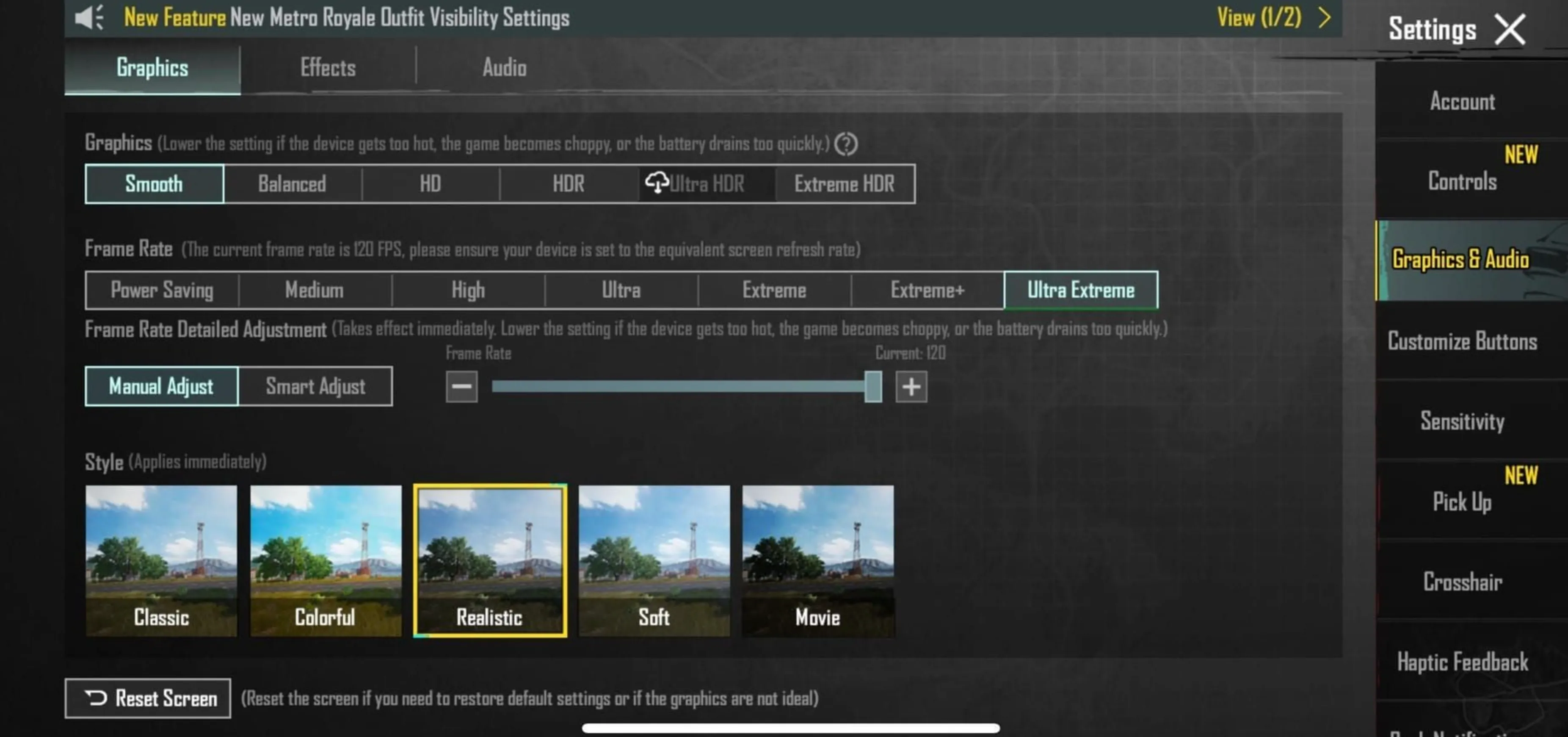
When it comes to PUBG Mobile, your graphics settings play a huge role in how the game feels. Better visuals look great, but pushing them too high can hurt performance and cost you fights. The right setup really depends on what phone you’re playing on.
If you’re using a newer device with a strong processor and plenty of RAM, you can safely run higher or even Ultra graphics for cleaner visuals and better detail. On older or budget phones, it’s usually smarter to stick with Medium or Low settings to keep the game smooth and responsive. Frame drops and stutters are far more dangerous than slightly worse graphics.
The best way to find your perfect setup is to test it yourself. Start with the highest graphics preset your device allows, play a few matches, and pay attention to lag or overheating. If things don’t feel smooth, lower the graphics step by step until the gameplay feels stable. Smooth performance will always give you an edge over flashy visuals.
Best PUBG Mobile Sensitivity Settings
Getting your sensitivity right in PUBG Mobile makes a massive difference in how consistent your aim feels. Sensitivity controls how far your crosshair moves when you swipe your finger. Higher values make your aim snap faster with small movements, while lower values give you tighter control but require longer swipes. Finding the right balance is what helps you track enemies smoothly and control recoil without overcorrecting.
PUBG Mobile lets you fine-tune sensitivity for every scope, as well as separate settings for camera movement and actual aiming. Because every player uses a different device and grip style, there’s no single “perfect” setup. That said, the settings below are a solid starting point used by many competitive players. You should treat them as a base and tweak them slightly until everything feels natural on your screen.
Camera Sensitivity
• TPP No Scope: 120
• FPP No Scope: 120
• Red Dot / Holographic: 60
• 2x Scope: 70
• 3x Scope: 25
• 4x Scope: 15
• 6x Scope: 20
• 8x Scope: 7
Aim Sensitivity
• TPP No Scope: 110
• FPP No Scope: 110
• Red Dot / Holographic (with Aim Assist): 55
• 2x Scope: 40
• 3x Scope: 33
• 4x Scope: 27
• 6x Scope: 22
• 8x Scope: 11
Once you apply these values, jump into the training ground and test each scope individually. If your crosshair keeps overshooting targets, lower the sensitivity slightly. If it feels sluggish when tracking moving enemies, raise it a bit. Small adjustments go a long way, and spending time dialing this in will noticeably improve your gunfights, recoil control, and overall consistency.
Best PUBG Mobile Gyroscope Sensitivity Settings
PUBG Mobile lets you aim without even touching the screen by using your phone’s gyroscope. Instead of dragging your finger, you simply tilt your device to control recoil and fine-tune your shots. Once you get used to it, gyro aiming can massively improve tracking, sprays, and long-range control.
Gyro sensitivity works very differently from standard camera or ADS settings, so copying someone else’s values blindly isn’t always perfect. That said, having a solid baseline makes testing much easier. Most players prefer higher gyro values for close scopes and gradually lower sensitivity as zoom increases, which helps keep long-range shots stable instead of shaky.
Below is a well-balanced gyro setup that many competitive and high-ranked players use as a starting point. You can fine-tune from here based on how steady your hands are and how aggressive your playstyle is.
Gyroscope Camera Sensitivity
• TPP No Scope: 330
• FPP No Scope: 330
• Red Dot / Holographic: 330
• 2x Scope: 300
• 3x Scope: 200
• 4x Scope: 190
• 6x Scope: 90
• 8x Scope: 60
Gyroscope ADS Sensitivity
• TPP No Scope: 280
• FPP No Scope: 280
• Red Dot / Holographic: 300
• 2x Scope: 300
• 3x Scope: 250
• 4x Scope: 180
• 6x Scope: 110
• 8x Scope: 80
If you’re new to gyro aiming, start slightly lower than these values and increase them slowly. Spend time in the training ground controlling recoil instead of jumping straight into ranked matches. With a bit of practice, gyro sensitivity can turn your sprays cleaner, your tracking smoother, and your overall gunplay far more consistent.
Conclusion
Finding the best PUBG Mobile settings really comes down to creating a setup that feels smooth, responsive, and comfortable for your playstyle and device. The right graphics options help you balance visual clarity with stable performance, while properly tuned sensitivity and gyroscope settings can massively improve your aim, recoil control, and reaction time. There’s no single “perfect” setup for everyone, so the key is using these recommended settings as a starting point and fine-tuning them through real matches and training mode. Once everything clicks, you’ll notice cleaner sprays, more consistent tracking, and better decision-making in fights, which all adds up to stronger performances and more wins in PUBG Mobile.
Posted On: December 23rd, 2025
Recent Articles


Our 1v9 support team is available 24/7 to help you with any questions or issues you may have.
support@1v9.gg


-a6d5b3e156bb.webp)





Loading...
1v9.gg is not endorsed or affiliated by any game developers or publishers.
2026 1v9, All Rights Reserved, Created By Ritesh (riteshsahoo.com)