

Best Deadpool Crosshair And Reticle Code Settings
Deadpool is one of the most versatile characters in Marvel Rivals, capable of switching roles while still relying heavily on precise aim with his dual pistols. Because he’s primarily a hitscan hero, your crosshair setup plays a bigger role than you might think. A cluttered or poorly configured reticle can throw off your tracking and make mid-range fights feel inconsistent.
Finding the best Deadpool crosshair isn’t about flashy designs. It’s about clarity, precision, and comfort. A clean center-focused reticle helps you land shots faster, track targets smoothly, and maintain control during chaotic team fights. Small adjustments to sensitivity and visual settings can also make a noticeable difference in how consistent your aim feels.
In this guide, we’ll break down the best Deadpool crosshair design, provide the reticle code, recommend optimized settings, and explain why each choice works. Whether you’re climbing ranked or just refining your mechanics, this setup will help you get the most out of Deadpool’s kit.
Best Deadpool Crosshair in Marvel Rivals
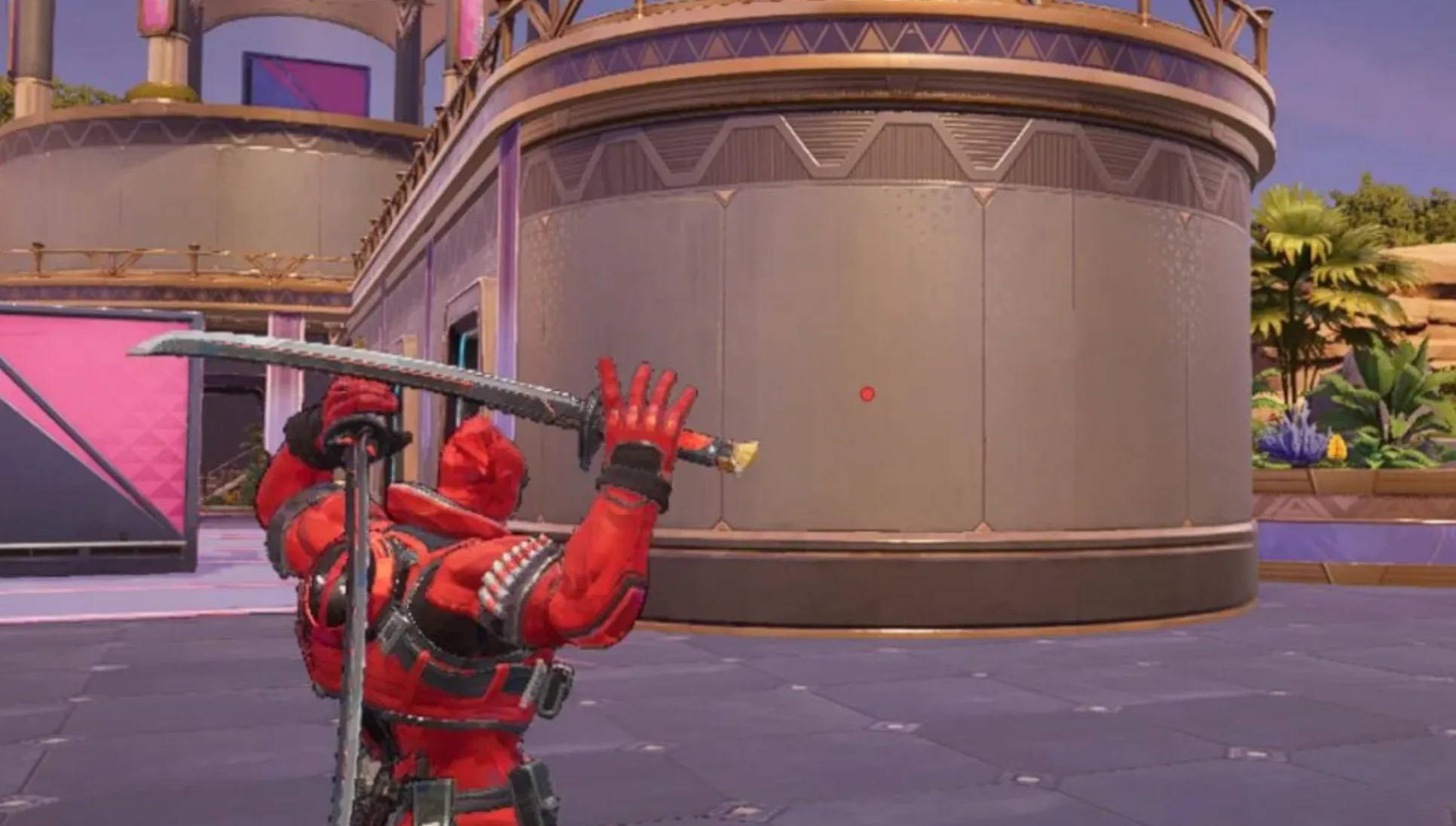
When playing Deadpool, simplicity wins. His dual pistols are hitscan, which means your bullets land exactly where your crosshair is placed. Because of that, you don’t need extra lines, circles, or spread indicators cluttering your screen. A clean center dot is the most efficient and consistent option.
A small, visible dot in the middle of your screen gives you precise feedback at all ranges. Whether you’re taking short peeks, tracking targets mid-fight, or holding angles, that single focal point keeps your aim sharp and distraction-free. Since Deadpool doesn’t rely on projectile travel time, there’s no need to lead shots — you just place the dot on the target and click.
Across all three of his roles, the center dot remains reliable. It works just as well in aggressive duels as it does in more controlled mid-range fights. The key is visibility without clutter. You want something easy to track without blocking enemy models.
For his katana attacks, the crosshair matters far less. Melee combat happens at close range, so precise pixel aim isn’t the priority. Instead, enable the Attack Range Hint setting to clearly see when enemies are within striking distance. That visual cue is far more useful than adjusting your reticle for melee.
Overall, the best Deadpool crosshair in Marvel Rivals is clean, minimal, and centered. The less visual noise on your screen, the easier it becomes to focus on tracking, positioning, and landing consistent shots.
Deadpool Reticle Code in Marvel Rivals
If you want to use the exact Deadpool crosshair setup, here is the full reticle string written in plain text so you can copy it directly into your settings:
Deadpool Reticle Code:
1;0;6.0,100.0,0.0,29.0;100.0,0.0,100.0,100.0;50.0,100.0,0.0,0.0;100.0,45.0,100.0,100.0;0.0,0.0,0.0,0.0;33.0,92.0,0.0,33.0;1.0;100.0,0.0,100.0,100.0;0.0;5,3,1,1;0.0,0.0,0.0;
This Deadpool reticle code is built around a small, clean center dot with full opacity and no extra visual clutter. Since Deadpool’s dual pistols are hitscan weapons, your bullets land exactly where the dot is placed, so adding crosshair lines or circles only makes it harder to track targets clearly.
The reason this Deadpool crosshair works so well in Marvel Rivals is simple: it keeps your screen clean during fast fights while still giving you precise feedback at long range. You always know exactly where your shot will land, whether you’re playing Vanguard, Duelist, or Strategist.
If you want maximum clarity and consistency across all roles, this reticle setup is one of the most reliable options you can use.
Deadpool Crosshair Settings in Marvel Rivals
For the cleanest and most consistent aim with Deadpool, you want to run a pure dot reticle with no extra lines or circles. The entire idea behind this setup is to remove distractions and keep your focus locked on a single, precise point in the middle of your screen.
Set your Reticle Type to Dot and turn Reticle Animation off. Deadpool’s pistols are hitscan, so there’s no benefit in having animated elements moving around your crosshair.
For the dot itself, use a width of 29 with 100 opacity so it stays clearly visible in every fight. Keep the outline width at 0, but leave the outline opacity at 100. This keeps the dot crisp without adding unnecessary thickness.
All blur-related settings should stay at 0, including dot blur and any circle blur. You don’t want a soft or faded look — sharp and solid is better for tracking targets.
Since this build is focused only on a center dot, you don’t need crosshair width, circle width, crosshair radius, circle radius (set it to 0), crosshair length, or crosshair angle. Those elements are simply not used in this Deadpool setup.
For Dot Color, choose whatever stands out the most to you. Many players prefer bright colors like neon green or cyan because they contrast well against most maps, but this is fully personal preference. Crosshair and circle colors aren’t relevant here since we’re not using those elements at all.
This Deadpool crosshair setup works so well in Marvel Rivals because it keeps your screen clean during chaotic fights while still giving you pixel-level precision at any range. With a simple, high-visibility dot and zero clutter, you’ll have full control over your aim across all three of Deadpool’s roles.
Best Deadpool Hero Settings in Marvel Rivals
If you want your Deadpool to feel smooth and consistent in Marvel Rivals, your hero settings matter just as much as your crosshair. Since he relies heavily on precise hitscan tracking with his dual pistols, clean mouse input and stable sensitivity are key.
For Mouse Sensitivity, a horizontal and vertical range between 3 and 5 works best for most players. This keeps your aim controlled at mid and long range while still allowing quick flicks during close fights. The exact number depends on your mouse DPI, but staying in that window gives you a balanced feel without being too twitchy or too slow.
Both Invert Horizontal Look and Invert Vertical Look should remain off unless you specifically prefer inverted controls. Most competitive players keep these disabled for consistency.
Turn Mouse Smoothing and Mouse Acceleration off. These two settings can interfere with raw aim consistency, especially when tracking fast-moving targets. Deadpool benefits from predictable, one-to-one mouse movement, not artificial adjustments.
Leave Center Mouse in Background off as well. It doesn’t provide a competitive advantage and can feel awkward in certain situations.
For Dual Pistols Ultimate Ability Target Sensitivity, the setting is still being refined by the community, so it’s best to keep it at default until a clear optimized value emerges. The same applies to the upgraded version of the ability sensitivity.
Make sure Attack Range Hint is turned on. This is especially useful when switching from pistols to katanas, as it helps you understand when enemies are within effective melee range.
Keep Raw Input off unless you specifically need it for hardware compatibility. Most players find standard input stable enough without toggling it.
Lastly, enable Allied Health Bars. This gives you better awareness during team fights and helps you decide when to push, peel, or reposition.
Overall, these Deadpool hero settings are built for stability, precision, and clean input. When combined with a minimal dot crosshair, they create a consistent setup that supports aggressive plays while keeping your aim reliable in every fight.
Conclusion
Finding the best Deadpool crosshair, reticle code, and hero settings in Marvel Rivals really comes down to one thing: clarity and control. Since Deadpool’s dual pistols are hitscan, you don’t need flashy crosshair designs or complicated visual elements. A clean center dot, stable sensitivity, and consistent mouse input give you everything you need to land shots reliably at any range.
By using a minimal dot reticle, disabling unnecessary visual effects, and keeping your sensitivity in a balanced range, you remove distractions and focus entirely on tracking and positioning. Pair that with smart use of Attack Range Hint for melee engagements, and you’ll feel much more confident switching between pistols and katanas during fights.
At the end of the day, the best Deadpool settings are the ones that make your aim feel natural and repeatable. Start with this optimized setup, adjust slightly if needed, and stick with it. Consistency is what truly separates average players from the ones who dominate every lobby.
Posted On: March 2nd, 2026
Recent Articles


Our 1v9 support team is available 24/7 to help you with any questions or issues you may have.
support@1v9.gg


-a6d5b3e156bb.webp)





Loading...
1v9.gg is not endorsed or affiliated by any game developers or publishers.
2026 1v9, All Rights Reserved, Created By Ritesh (riteshsahoo.com)